


 Subscribe
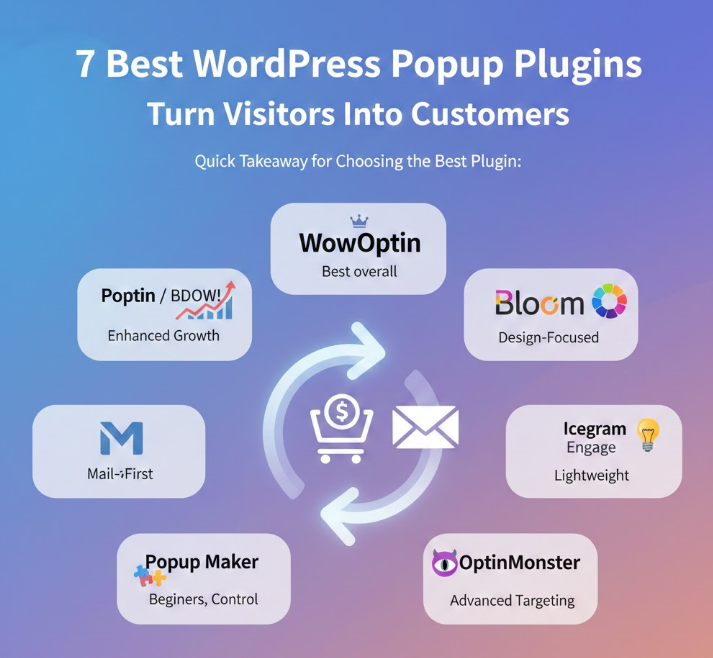
Quick Takeaway for Choosing the Best WordPress Popup Plugin:
WowOptin → Best overall popup builder for modern WordPress sites
Poptin / BDOW! → Best for enhanced growth, testing, and monetization
Bloom → Best for design-focused creators and branded opt-ins
Icegram Engage → Best for lightweight, non-intrusive lead capture
MailOptin → Best for email-first websites and content publishers
Popup Maker → Best for beginners who want control without complexity
Why Choosing the Right Popup Plugin Matters
Driving consistent traffic to a WordPress website is already a challenge. But turning those visitors into subscribers, leads, or paying customers? That’s where most sites struggle. The truth is, people don’t leave because your offer is bad — they leave because nothing nudges them to take the next step at the right time.
This is exactly why popup builders matter. When done right, popups don’t feel like random interruptions. They work as smart conversion tools that grab attention, keep visitors from bouncing too quickly, and gently guide them toward an action — whether that’s signing up, requesting a quote, or making a purchase.
That said, not every popup plugin fits every website. Some are built for beautiful design and branding, others shine in automation, targeting, performance, or advanced testing features. That’s why in this guide, we’ve reviewed and compared the best popup builders for WordPress — so you can confidently pick the one that matches your goals and your audience.
How We Chose the Best WordPress Popup Plugins
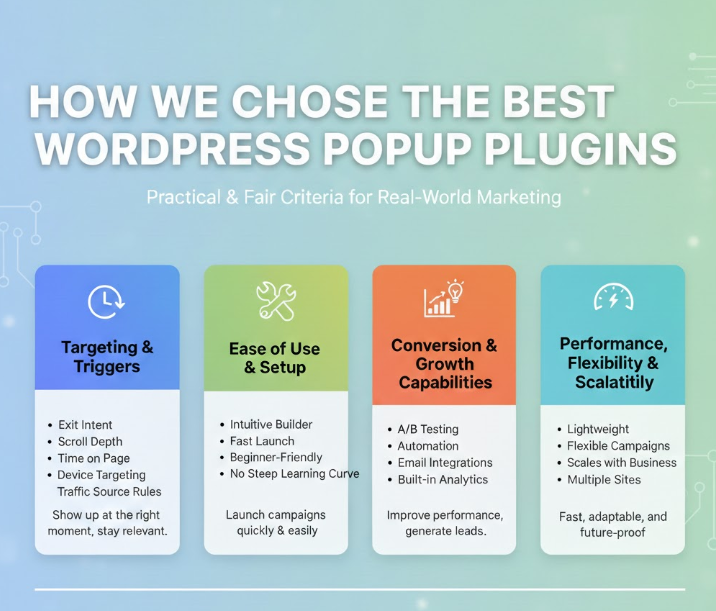
To keep this list practical and genuinely fair, we reviewed every popup plugin using four criteria that matter most in real-world WordPress marketing. The goal wasn’t to pick the “flashiest” tools, but the ones that can actually help you convert visitors into subscribers, leads, and customers.
Targeting & Triggers
A popup is only effective when it shows up at the right moment. We looked at how well each plugin handles targeting and timing, including exit intent, scroll depth, time on page, device targeting, and even traffic source rules. The more control you have here, the easier it is to stay relevant and avoid annoying people.
Ease of Use & Setup
A feature-packed plugin means nothing if it takes hours to configure. We paid attention to how intuitive the builder feels, how fast you can launch a campaign, and whether beginners can get solid results without a steep learning curve.
Conversion & Growth Capabilities
We focused on tools that go beyond basic popups. That includes features that actively improve performance, like A/B testing, automation, email integrations, built-in analytics, and even gamified formats when they make sense for lead generation.
Performance, Flexibility & Scalability
Popups shouldn’t slow down your website or force you into complicated workflows. We prioritized plugins that stay lightweight, offer flexible campaign options, and can scale with your business, whether you run a blog, an online store, or manage multiple sites for clients.
Comparing the Best Popup Builder Plugins for WordPress
Here’s a clean, side-by-side comparison to help you quickly spot the best popup plugin for your goals, whether you’re focused on lead generation, email growth, or turning visitors into customers.
Read also: 6 WordPress Squeeze Page Builders That Actually Increase Email Sign-ups
| Plugin | Key Features (What Makes It Stand Out) | Best For |
|---|---|---|
| WowOptin | Conversion-focused builder, A/B testing, deep targeting, ready-to-use templates | Best overall choice for marketers and business websites that want results without complexity |
| Icegram Engage | Lightweight, non-intrusive messages, fast setup, simple targeting, clean performance | Bloggers, content sites, and small businesses that want a subtle, effective lead capture |
| MailOptin | Email-first features, newsletters, opt-ins, automation, strong integrations | Content creators, educators, and sites where email marketing is a key growth channel |
| Popup Maker | Flexible triggers, form integrations, beginner-friendly controls, solid customization | Beginners and WordPress users who want control without visual overload |
| Bloom | Polished designs, elegant templates, multiple opt-in formats, brand-friendly look | Creators and bloggers who care about aesthetics and consistent branding |
| BDOW! | Advanced targeting, monetization tools, performance-focused scripts | Agencies and growth teams managing multiple websites and conversion campaigns |
| Poptin | Smart popups, automation, responsive design, detailed analytics | eCommerce stores and marketers focused on conversion optimization and engagement |
WowOptin – Popup Builder for WordPress
WowOptin is designed for website owners who want real control over when, where, and why popups appear, without turning setup into a technical project.
Instead of blasting the same message to every visitor, WowOptin pays attention to user behavior. It can track how people move through your site, which pages they spend time on, where they came from, and even whether they’re about to leave. That makes your campaigns feel more relevant, and a lot less intrusive.
On the design side, you get a flexible, Canva-style editor that makes building popups surprisingly smooth. You can visually create high-converting layouts that match your brand, without relying on generic templates that look the same on every website.
What really makes WowOptin stand out is the targeting engine behind it. You can display different messages based on behavior, device, location, or traffic source. In practice, that means fewer “random” popups and more offers that make sense in the moment. It also makes testing easier, so you can improve performance based on real data instead of guesswork.
To speed things up, WowOptin includes AI-powered copy support and a large template library. You can launch a polished campaign fast, whether you’re collecting emails, promoting a limited-time offer, or trying to reduce cart abandonment. It adapts well to different goals, which is exactly what you want from a modern popup builder.
Key Features
- Canva-style drag-and-drop popup and opt-in builder
- 700+ ready-made popup, banner, slide-in, and inline templates
- AI copywriting powered by ChatGPT, Gemini, and Grok
- Advanced audience targeting by device, behavior, location, and traffic source
- Manual and automated A/B testing for optimization
- Seamless integration with 10+ email marketing and analytics tools
What Users Like
Many users highlight the drag-and-drop editor as one of the biggest advantages, especially because it allows flexible layouts, multi-step forms, and easy element positioning. Reviews often mention that the builder feels intuitive and gives plenty of customization options, while still being beginner-friendly.
People also appreciate the variety of triggers, including exit intent, scroll-based popups, time delays, and targeting by device or geolocation. Another common point in feedback is the support experience. Users frequently mention fast responses, helpful guidance, and surprisingly strong features even in the free version.
Icegram Engage
Icegram Engage is a great option for site owners who want to communicate with visitors in a clean, respectful way. Instead of relying only on classic popups, it gives you multiple message formats like action bars, slide-ins, inline blocks, and overlays. This makes it easier to guide users naturally while they browse, without constantly interrupting their experience.
Another strong point is control. You can decide exactly when and where each message appears, then fine-tune it based on specific pages, device type, timing, or visitor behavior. When set up properly, campaigns feel helpful and relevant, not pushy or random.
Icegram Engage also keeps things simple from a technical perspective. You don’t need coding skills to build campaigns, adjust variations, or track results. With a generous free version and upgrade options that scale as your site grows, it’s a solid choice for anyone who wants consistent lead generation without unnecessary complexity.
Key Features
- Multiple message types, including popups, bars, slide-ins, and inline blocks
- Offers different types of popups like lightbox, ecommerce, and entry popups
- Precise targeting and display rules for pages, devices, and users
- 50+ mobile-responsive, conversion-focused templates
- Seamless integrations with major email marketing platforms
- Lightweight, performance-friendly design with no forced branding
What Users Like
Many users mention that Icegram Engage is quick to set up and surprisingly generous in terms of features. Some reviews describe it as excellent, easy to use, and genuinely effective for basic lead capture. Others highlight how smoothly it fits into WordPress, and how little time it takes to launch a campaign and start seeing results.
MailOptin
MailOptin is a strong choice for website owners who want pop-ups to do more than simply collect email addresses. It’s built around the full email journey, from capturing leads to keeping them engaged with automated newsletters, all from inside WordPress. Instead of switching between multiple tools, you can build your list, send updates, and nurture subscribers in one workflow.
One of the best things about MailOptin is how naturally it fits into your content. You can place opt-in forms inside blog posts, after an article, in sidebars, or use subtle notification bars that feel clean and non-disruptive. This makes it easier to grow subscriptions without ruining the reading experience.
MailOptin also stands out when it comes to automation. It can notify subscribers whenever you publish new content, send digest emails, or trigger messages based on specific user actions. With smart targeting and strong integrations, it helps turn casual visitors into loyal, long-term subscribers.
Key Features
- Multiple opt-in types, including popups, slide-ins, bars, and inline forms
- Automated email newsletters and new post notifications
- Before and after opt-ins for increased conversion through blogs and webpages
- Spam protection through a Honeypot method to prevent spam submissions
- Built-in A/B testing for opt-in optimization
- WooCommerce, LMS, and membership plugin integrations
What Users Like
Users consistently point to MailOptin’s customer support as a major advantage. Recent reviews mention fast, hands-on help with things like exporting campaigns, adding currency support, and connecting Elementor/WordPress setups with platforms like Keap. Beyond support, many people describe the plugin as reliable and stable. It “just works,” and users often recommend it for sending blog post updates through services like Mailchimp.
Read also: How to Use Mailchimp with WordPress: A Comprehensive Guidets
Popup Maker
Popup Maker is a solid pick for WordPress users who want an easy way to launch popups without getting buried in settings. It focuses on the essentials: how a popup is triggered, who should see it, and how often it appears. That’s exactly why it works so well for beginners who need a reliable solution without a complicated setup process.
One of its biggest advantages is how smoothly it fits into an existing WordPress stack. Popup Maker doesn’t try to replace your forms or force you into a new system. Instead, it connects with popular form plugins and email tools, so your popups can open or close based on real actions like button clicks or form submissions. This makes the experience feel more natural for visitors and more practical for site owners.
It’s also surprisingly scalable. With cookie-based controls, targeting conditions, and behavior tracking, you can fine-tune how popups appear over time. That helps you avoid showing the same message too often, while still getting the conversions you want.
Key Features
- Action-based popup triggers including click, form submission, and scroll
- Great integration with popular WordPress form plugins
- Cookie and frequency controls to prevent repeat popups
- WooCommerce-specific upsell and cross-sell popup rules
- Cookie-based display rules to prevent popup fatigue
- Detailed analytics and performance tracking (premium)
What Users Like
Users often describe Popup Maker as a plugin that simply does the job. Reviews highlight that it’s easy to use, flexible enough for customization, and great for basic popup needs. The general feedback is that it delivers strong functionality without feeling complicated or overwhelming, which is exactly what many WordPress users want.
Bloom
Bloom is made for creators and businesses who care about design and branding, and want opt-in forms that actually look like they belong on the site. Instead of focusing on heavy automation or advanced targeting logic, Bloom’s biggest strength is helping you build opt-ins that feel polished, intentional, and visually consistent with your brand.
It’s especially good at capturing subscribers during high-engagement moments. For example, when someone finishes reading a post, leaves a comment, completes a purchase, or scrolls far down a page, Bloom can trigger an opt-in right when the visitor is most interested. When done well, it doesn’t feel aggressive. It feels well-timed.
Bloom also keeps things simple even when you’re running multiple campaigns. You can manage several opt-ins, email lists, and split tests from one clean dashboard, while tracking results in real time. That makes it a practical choice for sites that want good-looking opt-ins without a complicated workflow.
Key Features
- 6 distinct opt-in display types including popups, fly-ins, and content lockers
- 100+ elegant, design-focused opt-in templates
- Engagement-based triggers like commenting, purchasing, and inactivity
- Advanced design customization (colors, borders, layouts, images)
- Built-in split testing with conversion comparison
- Centralized dashboard with detailed opt-in performance stats
What Users Like
Users often mention that Bloom integrates with 16 popular email marketing services and gives you six different display types to work with. Many also appreciate the large collection of 100+ templates and the level of customization available, including colors, images, fonts, and animations that can be adjusted to match a website’s style.
Another commonly praised feature is the dashboard, which offers clear conversion stats and built-in A/B testing. This combination makes Bloom especially appealing to people who want strong lead-generation tools while keeping everything visually on-brand.
BDOW!
BDOW! stands out for one big reason: it’s built around a centralized workflow. You can manage multiple websites from a single dashboard, which makes it especially appealing for agencies, consultants, and founders who run several projects at the same time. Instead of logging into five different WordPress installs just to tweak a popup, you can keep everything organized in one place.
It also makes optimization much easier. With built-in A/B testing, you can test different offers, headlines, layouts, or form styles and quickly see what performs best. No extra tools, no messy setup. Just run the test, review the results, and pick a winner with confidence.
BDOW! also has a strong focus on monetization. Thanks to native WooCommerce integration and autoresponders for content upgrades, it’s designed to turn traffic into real business value. That can mean more upsells, better cart recovery, or faster lead capture with instant delivery.
Add in performance-focused scripts and GDPR-friendly behavior, and you get a popup system that’s clearly built for speed, scale, and conversion-driven teams.
Key Features
- Centralized dashboard to manage multiple websites and campaigns
- Built-in A/B testing with one-click winner selection
- Advanced targeting based on behavior, referrers, and exit intent
- WooCommerce monetization tools for upsells and cart recovery
- Fast-loading, SEO-friendly, GDPR-compliant popup scripts
- Autoresponders for delivering content upgrades instantly
What Users Like
Users often mention that even the free version feels polished, with a clean and helpful interface. Support is another strong point in reviews. Some describe it as absolutely stunning, with quick replies that make you feel like a priority. Others highlight how fast issues get resolved, which adds a lot of trust when you’re running campaigns across multiple sites.
Poptin
Poptin is built around visitor behavior and real-time personalization, which makes it a strong option for marketers who want popups to react to intent, not just show up on a schedule. Instead of relying on static display rules only, it helps you tailor the experience based on what people are doing on your site right now.
One feature area where Poptin clearly stands out is gamification. Formats like spin-to-win wheels, scratch cards, and gift-style popups turn lead capture into something interactive. This works especially well for WooCommerce stores, limited-time promotions, and campaigns where you want to boost engagement fast without making the offer feel “forced.”
Poptin also goes beyond being a simple popup tool. It works more like a lightweight conversion platform, with built-in autoresponders, landing-page links, automation through Zapier, and analytics that help you track performance and improve results over time. If you want one tool that covers both lead capture and follow-up actions, Poptin is a very practical choice.
Key Features
- Advanced behavioral targeting (traffic source, device, geo, actions)
- Gamified popups like spin-to-win, scratch cards, and gift boxes
- Visual drag-and-drop builder for popups and inline forms
- Native autoresponders and automation via Zapier
- Deep analytics along with heatmap and session-recording integrations
What Users Like
Users often mention the ready-made popup templates as a big plus, especially for launching campaigns quickly. Support is another highlight, with many reviews describing the team as responsive and genuinely helpful. People also like how fast it is to build and publish a popup, with some saying they were able to go from idea to live campaign in minutes. Overall, users describe Poptin as easy to use, visually clean, and a solid free option to get started.
Note: We haven’t included pricing details for these plugins because plans and features can change frequently. For the most accurate information, it’s best to check each plugin’s official page for updated pricing and current offers.
Read also: WordPress Marketing Tools: How to Grow Traffic, Leads, and Sales
So, Which Popup Plugin Should You Choose for Your Website?
Choosing the right popup plugin isn’t really about picking the one with the longest feature list. What matters more is what you want your popups to achieve. Some tools are made for creators who care about design and brand consistency. Others are built for aggressive conversion testing, fast experimentation, or email automation. The best option is simply the one that fits your goals, your workflow, and the stage your website is currently in.
If you’re looking for a well-rounded, modern solution that combines advanced targeting, a flexible visual builder, AI-powered copywriting, and testing tools in one place, WowOptin is the strongest all-around pick. It’s a great fit for businesses and marketers who want full control over campaigns without juggling multiple plugins and extra services.
If your strategy is heavily conversion-focused and you want to optimize based on data, Poptin and BDOW! are the standouts. Poptin is especially effective when you want behavior-based personalization and gamified popups that boost engagement. BDOW! is ideal for fast testing, quick iteration, and managing multiple websites from one centralized dashboard.
If your priority is clean visuals and brand consistency, Bloom is a smart choice. And if you run a content-driven site where you want subtle, non-intrusive messaging that still captures leads, Icegram Engage is a reliable option that keeps things lightweight and user-friendly.
Conclusion
At the end of the day, the best popup plugin is the one that fits your website’s goals and helps you improve conversions without hurting the user experience. Popups can be a powerful growth tool, but only when they feel relevant, load fast, and match the way people actually browse your site.
If you want to get real results, focus on the fundamentals first: clear messaging, smart targeting, mobile-friendly design, and testing what works instead of guessing. Even a simple popup can outperform a complex setup when it’s built around the right offer and shown at the right moment.
And if you want to go beyond plugins and build a conversion-focused WordPress setup that performs smoothly long-term, Codico can help you with Web Development, improve the customer journey through UI/UX Design, and automate lead handling with AI Integration.