


 Subscribe
If your goal is to collect more email opt-ins from site visitors, a squeeze page is one of the most effective ways to strengthen your WordPress sales funnel. When done properly, squeeze pages can significantly improve list growth and help turn casual visitors into real prospects.
That’s where most WordPress users run into a limitation.
WordPress itself doesn’t offer a built-in way to create squeeze pages. If you want one on your site, you’ll need to rely on a third-party solution designed specifically for that purpose.
Site security and fast load times matter, of course. Keeping uptime high and pages loading in under a second is always important. But for many businesses, the ability to capture email addresses and consistently grow an audience is what truly drives long-term results.
To make that process easier, let’s break down what squeeze pages are and walk through six of the best WordPress squeeze page builders that can help you grow your email list without unnecessary complexity.
What is a Squeeze Page?
You may already be familiar with landing pages, so it’s fair to wonder what exactly a squeeze page is and whether there’s any real difference between the two. The terms are often used interchangeably, which only adds to the confusion.
In practice, a squeeze page is simply a very specific type of landing page. The relationship is similar to how certain shapes fit within a broader category. Every squeeze page is a landing page, but not every landing page qualifies as a squeeze page.
A standard landing page can serve many purposes. It might promote a product, encourage a purchase, push users to book a call, or guide them toward a feature or service. A squeeze page, on the other hand, has a much narrower focus.
Its only goal is email opt-ins.
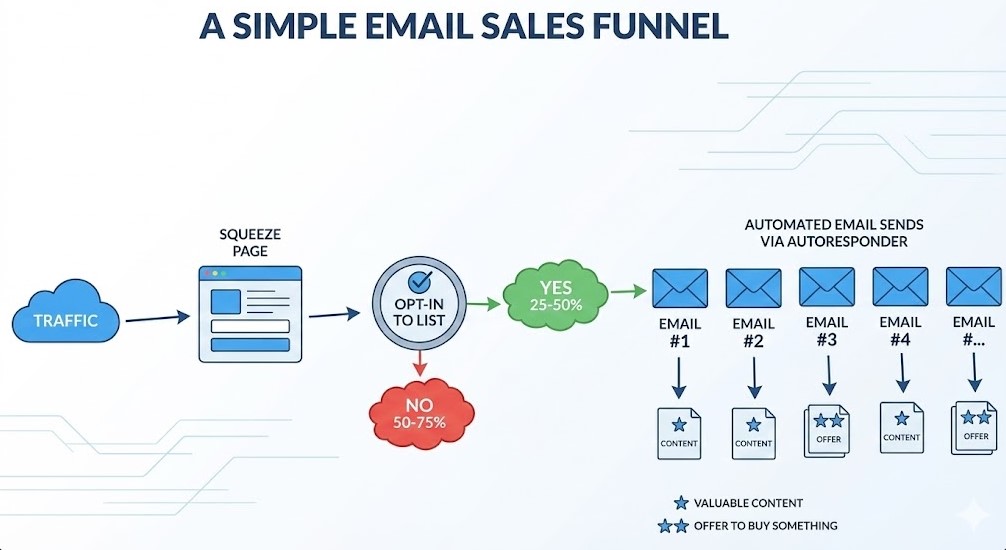
If you’re building a WordPress funnel to sell services or products, squeeze pages are often the most logical starting point. They’re designed to do one thing well: gently persuade visitors to share their email address. Nothing more. When a visitor subscribes, the page has done its job. If they leave without opting in, it hasn’t.
What Are the Elements of a Good Squeeze Page?
Effective squeeze pages tend to be fairly direct. The goal is to reduce choice as much as possible and guide the visitor’s full attention toward a single action: leaving their email address.
The fewer decisions a visitor has to make, the more likely they are to complete the opt-in. That’s why strong squeeze pages avoid unnecessary content and focus only on what moves the user closer to subscribing.
In most cases, high-performing squeeze pages include a few core elements.
Attractive Lead Magnet
A lead magnet is what you offer visitors in exchange for their email address. It needs to feel genuinely useful and relevant to the audience you are targeting. This could be a short guide, a checklist, a resource library, or early access to a product. In the CoDiCo example above, the incentive is framed as Start for Free, lowering the barrier and making the opt-in feel risk-free.
Strong Call to Action
The call to action is what turns interest into action. It should be clear, specific, and action-oriented. Instead of vague wording, a good CTA tells the visitor exactly what will happen next. Phrases like Start for Free work well because they are simple, direct, and focused on immediate value.
Minimal Distractions
Every extra element on the page competes for attention. Navigation menus, external links, and unrelated content all increase the chance that a visitor will leave without subscribing. Strong squeeze pages intentionally remove these distractions, keeping the focus on the opt-in form and nothing else.
What Are the Best WordPress Squeeze Page Creators?
When it comes to building squeeze pages in WordPress, most tools fall into one of two categories. Both approaches work well, but they differ in how they integrate with your site and how much control they offer.
Squeeze Page Plugins
These tools live directly inside your WordPress dashboard and behave like standard plugins. You install them, activate them, and build your squeeze pages without ever leaving WordPress.
External Services
These platforms operate as standalone services but connect smoothly to WordPress through dedicated plugins or integrations. They often provide more advanced features, while still allowing you to publish pages on your site.
This list includes examples from both categories so you can choose the approach that fits your workflow best.
Squeeze Page Plugins and External Services
- WordPress Landing Pages
- Thrive Landing Pages
- Leadpages
- Landing Page
- OptIn Ninja
- WP Lead Plus X
1. WordPress Landing Pages (Free Plugin with Premium Add-ons)
WordPress Landing Pages is a free plugin designed to help you create different types of landing pages. It works particularly well as a squeeze page builder because many of its ready-made templates are built specifically for email opt-ins rather than general marketing pages.
The plugin comes with a visual editor that lets you see changes as you make them, which makes the design process more intuitive. You can either match your existing WordPress theme or start from one of the templates available in the plugin’s library.
Once your squeeze page is live, WordPress Landing Pages gives you access to conversion tracking and A/B testing tools. This allows you to experiment with different layouts or calls to action and gradually improve performance over time.
One important thing to keep in mind is that some key squeeze page features are only available through paid add-ons. For example, integrating your squeeze page with certain email marketing platforms requires an additional purchase.
Even with that limitation, WordPress Landing Pages remains a solid option if you want to start experimenting with squeeze pages without committing to a large upfront investment.
2. Thrive Landing Pages (Premium Plugin)
Thrive Landing Pages is a premium landing page builder developed by Thrive Themes, a WordPress company known for its strong focus on conversions and performance.
The plugin is bundled with Thrive Content Builder, which gives you a visual, drag-and-drop editing experience. Pages are built using a WYSIWYG interface, so you can design and adjust layouts directly on the page without touching code. The landing page library includes more than 162 templates, many of which are created specifically for squeeze pages rather than generic marketing layouts.
Every template is built with conversion principles in mind. Layouts, spacing, and content hierarchy are all designed to keep attention focused and encourage visitors to opt in.
One area where Thrive Landing Pages clearly stands out is how its templates work together as part of a funnel.
Instead of treating each page as a standalone design, the templates are visually connected. This makes it easy to guide visitors from the opt-in page to the download page and then to the thank-you page without breaking visual consistency. Fonts, colors, and layout elements remain aligned throughout the funnel, creating a smooth and cohesive experience from start to finish.
Thrive Landing Pages is available for $69 with a single-site license.
3. Leadpages (Premium SaaS with WordPress Plugin)
Leadpages sits at the higher end of the pricing spectrum. It’s easily the most expensive option on this list. That said, the cost reflects a feature set designed for speed, simplicity, and scale.
Unlike traditional WordPress plugins, Leadpages works as a standalone platform. Squeeze pages are created directly on the Leadpages website rather than inside your WordPress dashboard. To bridge that gap, Leadpages provides a dedicated WordPress plugin that makes publishing pages on your site straightforward and hassle-free.
The platform includes an easy-to-use drag-and-drop editor along with around 75 free templates and a much larger library of premium designs. All templates are fully responsive, which means your squeeze pages work just as well on mobile devices as they do on desktops.
One advantage of using Leadpages is hosting. You can choose to have Leadpages host your landing pages for you, which helps speed up deployment and removes technical friction. Once a page is live, you can run A/B tests to fine-tune performance, although this feature is not available on the lowest pricing tier.
Leadpages also integrates with most major email marketing platforms, making it flexible regardless of which service you use to manage your list. If you’re willing to invest in a premium tool that prioritizes ease of use and fast setup, Leadpages is a strong option.
Pricing starts at $37 per month when billed monthly or $25 per month when billed annually.
4. Elementor (Free / Premium Plugin)
Elementor is one of the most widely used WordPress page builders, and while it’s not designed exclusively for squeeze pages, it works extremely well for building them. The plugin is available in a free version, with more advanced features unlocked through Elementor Pro.
With Elementor, squeeze pages are built using a visual drag-and-drop editor that lets you design pages in real time. You can start from a blank canvas or choose from a growing library of pre-designed templates, many of which are well suited for email opt-ins and simple funnels.
The free version of Elementor allows you to create clean, responsive squeeze pages with basic elements such as headings, text blocks, images, and forms. For more advanced lead-generation features, Elementor Pro adds form integrations, additional widgets, and greater control over layout and styling.
Elementor integrates with popular email marketing services through built-in connectors or third-party integrations, making it easy to send new subscribers directly to your email list.
While Elementor doesn’t focus solely on conversion optimization in the same way some dedicated squeeze page tools do, its flexibility and ease of use make it a solid option. It’s especially useful if you already use Elementor on your site and want to create squeeze pages without adding another plugin.
5. Convert Pro (Premium Plugin)
Convert Pro is a premium WordPress plugin focused on email capture and lead generation. It’s not free, but it offers a strong set of features that make it worth considering if you want more control over how you present your opt-in forms and squeeze pages.
With Convert Pro, you can build a variety of opt-in forms — including popups, slide-ins, inline blocks, and full-page squeeze layouts — all using a visual drag-and-drop editor. The interface is intuitive, so even users without coding experience can design high-converting pages and forms.
The plugin integrates smoothly with most major email marketing services such as MailChimp, ActiveCampaign, AWeber, GetResponse, ConvertKit, and others. That means you can capture email addresses and send them directly to your existing list without extra setup.
One useful feature in Convert Pro is behavior-based triggers. You can set forms to appear based on scroll depth, time on page, exit intent, or other user actions — which helps you show the right offer at the right moment and potentially improve conversion rates.
Convert Pro also includes built-in analytics and A/B testing, so you can experiment with different designs and offers to see what resonates best with your audience.
Overall, Convert Pro is a flexible and user-friendly choice if you want more than just a basic squeeze page. Its premium capabilities make it a compelling tool for marketers who need a reliable lead capture solution inside WordPress.
6. SeedProd (Free / Premium Plugin)
SeedProd is a popular WordPress page builder that’s often used for creating landing pages, but it also works very well as a squeeze page creator. The plugin offers both a limited free version and more advanced premium plans.
With SeedProd, you build squeeze pages using a clean drag-and-drop editor that focuses on speed and simplicity. The builder doesn’t overwhelm you with options, but it includes all the essential elements needed to create focused opt-in pages that load fast and convert well.
One of SeedProd’s strengths is its template library. You can start from a number of pre-designed landing page layouts and customize them to match your brand. Many of these templates are designed with email sign-ups in mind, which makes them a good fit for squeeze pages.
SeedProd integrates smoothly with popular email marketing services, allowing you to connect opt-in forms directly to your email list without complicated setup. Even the free version supports basic integrations, which makes it easy to get started.
When upgrading to a premium plan, you unlock additional templates, advanced customization options, and more flexibility in how your pages are structured. While SeedProd doesn’t try to be an all-in-one marketing platform, it does a solid job at one thing: helping you create clean, conversion-focused squeeze pages inside WordPress.
SeedProd is a strong choice if you want a modern squeeze page builder that’s easy to use, actively maintained, and flexible enough to grow with your needs.
Final Thoughts
A strong squeeze page is never just about design or tools. It’s about understanding user intent, reducing friction, and guiding visitors toward a single, meaningful action. The right WordPress squeeze page builder helps with the technical side, but real results come from how everything works together.
When squeeze pages are built as part of a broader Web Development strategy, they stop being isolated landing pages and become a natural extension of your funnel. Add thoughtful UI/UX Design on top of that, and the experience feels intuitive rather than pushy. Visitors know what to do, why they should do it, and what they’ll get in return.
Whether you choose a lightweight plugin or a full-featured platform, the goal stays the same. Create focused pages that respect your audience’s time, deliver clear value, and make subscribing feel like the obvious next step.
Done right, squeeze pages don’t just grow your email list. They lay the groundwork for stronger relationships, better conversions, and long-term business growth.