















El sistema de despacho en resumen: CodiCo en 18 minutos
Un recorrido completo por CodiCo, el software de despacho para traslados al aeropuerto: cómo llegan las reservas, cómo se asignan los viajes automáticamente, qué ven los conductores en la CodiCo Driver App y cómo funcionan los pagos y los socios, todo en una pantalla.
Qué verás en este vídeo
Haz clic en una marca de tiempo para reproducir el vídeo desde ese momento.
Transcripción del vídeo
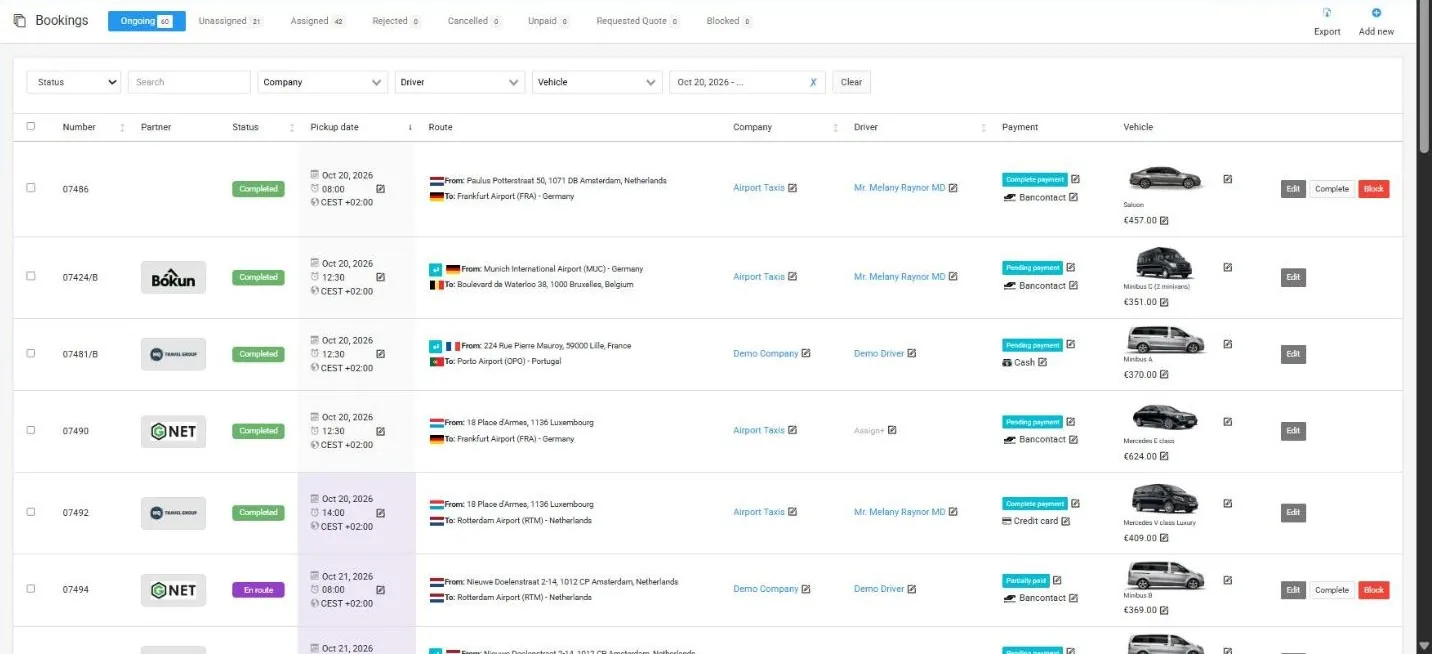
0:00Hello, my name is Artim. I am the co-founder of the company CodiCo. And today I would like to present to you some features of our product CodiCo Dispatch software. I want to point out right away that each system is set up and launched on a separate dedicated server which guarantees high performance and maximum protection of your data, your client’s data, as well as the ability to scale and adapt the product to your specific needs and business requests. that is your system will be located only on your server and no one else will be there. In other words, a separate server is allocated for each system. Now, let’s quickly go over the capabilities of our product. The first section is orders. Here, all orders that have not yet been assigned are listed. Orders that you have already assigned to drivers, rejected orders that uh drivers or or your partners have declined, orders that were cancelled by the client or by you, and ongoing orders, those that are currently in progress. Here you can also see the status of these orders.
0:54Order number, date and time from where to where, whether it’s a roundtrip or oneway, who the order is assigned to, who the driver is, payment method, payment status, order amount, type of car. Right here in the list, you can edit some data. For example, the date and time the order starts, the executive, the driver, the payment method, change the payment status, the car, and so on. If you want to see more details, you can simply click on the order and it will open in a popup window where all the details of this order will be available to you. In addition, you can click the edit button and go to a separate page for editing this order where you can manage additional options such as child seats, bicycles, waiting, airport meetings, and so on as well as client flight data, addresses, payments, client data, and so on. Here in the radial history, you can see the history of this order, all changes, all additions that were made to it. By clicking the add new button, you go to the page for creating a new order, which is highly flexible and allows you to create an order for both past and future dates. Any addresses, any number of passengers, any additional services. You choose which type of car to assign. You fully manage the payment method, the cost of this order. For example, it can be a credit card. The order cost is €100. A deposit was made in advance of
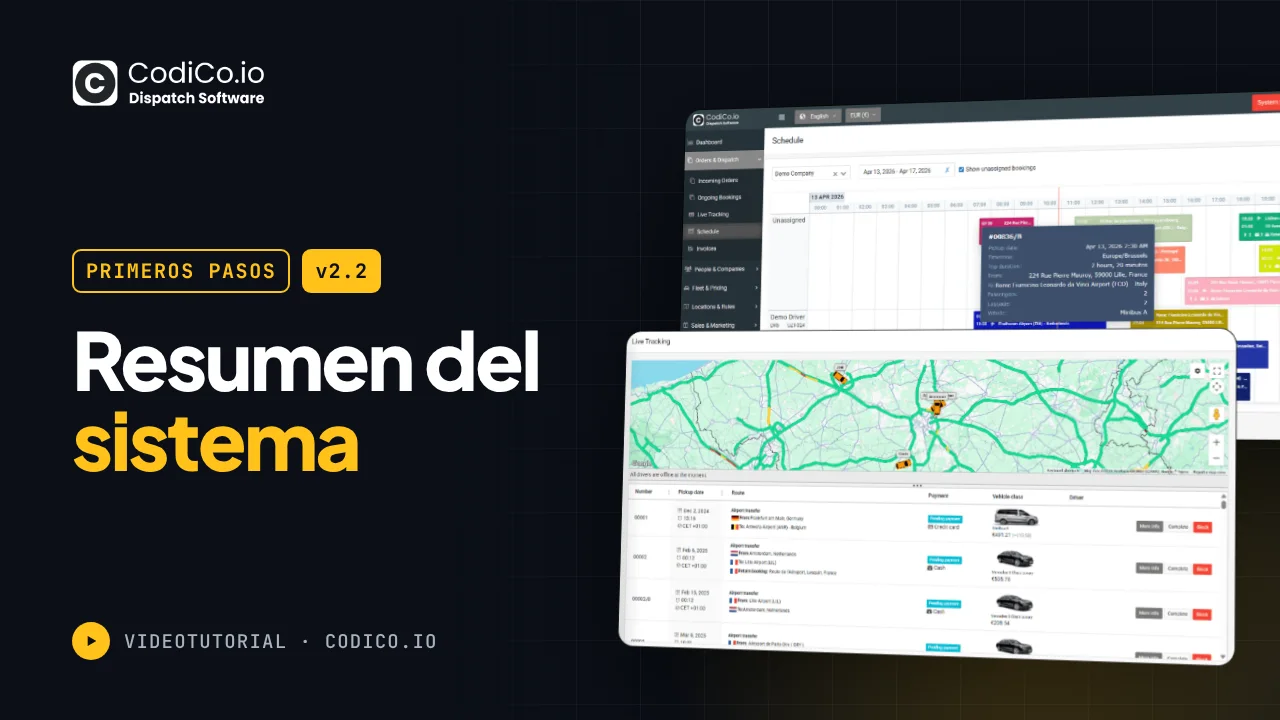
2:09€20 if it’s a cash payment. Your commission from this order, if you give it to a partner, let’s say, is €20. The driver should receive €80 in cash. The payment status is partially paid as there is a deposit of €20. Here, you can also select the client if they are in the database. You start typing their name and it pulls from the database. If the client is not there, you can simply continue filling in all the fields and the client will be automatically created. From here, you can also contact the client via email or send them a message directly on WhatsApp using their number. Here you can assign the order to a specific partner, choose a car, choose a driver who will fulfill this order. The car data is automatically pulled in. The next section is life hacking. Here you can see your current orders for the selected period, see their status, and monitor your drivers in real time on the map. That is see who is where, which order they are fulfilling, what status the order is in, and so on. the schedule section planner. Here in a convenient calendar view, you can see the workload of your drivers clearly, see all unassigned orders, and easily assign them to a driver by simply dragging and dropping. If the driver has another order at that time, the system will warn you, but you can choose to ignore it at your discretion. That’s it. The order is automatically assigned. You can manage the time range. You can see the workload
3:24of your partners. When you hover over an order, a pop-up window appears with brief information about it. Clicking on the order opens a pop-up with detailed information about the order. You can also create new orders from here by clicking on create booking. You are already familiar with the form. Alternatively, you can click on the appropriate time on the timeline. A popup with a form will also open where the date and time will already be set and the driver and company you want to assign will already be selected. You just need to fill in the order details. This method of adding new orders significantly simplifies the manual process and helps save your time. In the invoices section, all payments are stored here. Payments for orders by clients, payout commission payments for your partners and so on. The companies section here are all the companies including your partners. By clicking on it, you can view the details of this partner, their billing information, bank details for payments, what types of cars they have, which airports they serve, and in which areas they provide their services. You can also connect with this partner if they are using our CodiCo system. You can connect directly with them by exchanging tokens and transfer your orders to each other directly from system to system. That is there is no need to search for a partner. No need to call them or write to them on WhatsApp.
4:38There is no need for manual work. Everything happens automatically. You just assign the order to this partner and a copy of this order immediately appears in their system. They won’t need to enter anything manually. The same goes for you for the client. Everything will look and work as if you are fulfilling this order as if the order is being processed by your system. that is all notifications will be received from your name even though the order will actually be fulfilled by your partner. The drivers section here you can also add drivers. Drivers can be of several types. A driver can be on a fixed salary or work on commission with you. Naturally, just like with companies, there is a commission section where all payments are accounted for. The same goes for drivers. There is a commission section where all orders will be accounted for. It shows which orders were assigned to this driver for what amount and what commission they have. At the same time, the driver or partner can know the full cost of the order or only the money they will receive from this order. That is they can we have an option available so they do not know what the full cost of the order was. And mobile apps for drivers. We already have ready to use published mobile apps for your drivers which they just need to download, log in with the access you provide and they can immediately start fulfilling orders. A detailed instruction is provided at the top on how it all works and how to set it up.
5:53It’s quite simple. There should be no difficulties with this. The customers section here is a list of all your clients. You can view details about each client. You can also directly contact them here via email or WhatsApp. In the vehicles section, you can manage all types of your vehicles. You can specify basic settings starting from the number of passengers and luggage, whether this car is available, the car’s name, the type of car, its photos, and also the basic prices at which the car can operate. This can be a price per kilometer or a price per kilometer depending on the distance. That is the longer the distance, the lower the price. Additionally, we have a minimum trip cost that is even if the trip calculation is cheaper than the minimum cost, the system will still request the client to pay the minimum cost.
6:38Additionally, we have a prepayment option. If the client chooses to pay in cash, you can require a mandatory prepayment in the form of a fixed amount or percentage of the total order cost. We also have an auction. This is for those who do not want to immediately show their clients the cost or have difficulty estimating the trip. In this case, you can enable the auction option and the system will offer the client the buy request option. That is, they make a request, you receive it, evaluate it, and only then send them your price. The same goes for your partners. If you can’t fulfill this order, you can share it with your partners. They will receive this request and provide their prices for how much they are willing to complete this trip, and the client will choose the best and most suitable offer. Whoever wins the auction will accordingly carry out the trip. In the RO pricing section, you can set special prices for trips from certain zones.
7:28It’s worth noting that in our system, you can create, first of all, you can operate in different countries simultaneously. Our system is not limited to working in just one country. that is you can provide your services in Belgium, France and Germany at the same time. There are no issues with this and naturally in each country you can create your own zones and set special prices between these zones. For example, in this case we have set up let’s take a look. We have set it up so that from Brussels airport to Brussels city center in both directions whether from the airport to the location or from the location to the airport a fixed price is set and payment methods such as cash, credit card or band contact are supported. And here they are the prices. fixed prices for each type of car. For the sedan, it’s €55. For the estate, it’s 59. For the minibus, it’s 64. For minibus B, it’s 69. For minibus C75, and so on. That is, with one entry, you can immediately add prices for all types of cars. Additionally, you can set prices for additional services such as meeting at the air, day and night prices in case you have special prices available at night or during the day. That is here. You can also set this with one entry for all types of your vehicles. Period. Pricing.
8:42In this section, you can set prices for trips at certain times. For example, on Christmas, during some holidays, or at the time of some events, you can set special prices that may be higher than your base prices or lower on the contrary than your base prices. In the vehicle mobility section, you can set again using zones, the availability of your vehicles in certain zones. For example, in this case, in this zone, the sedan is available, but the estate type vehicle is unfortunately closed. and the minibus a type vehicle is only for passenger pickup or it may be only for passenger drop off. The next section is the list of airports. Here you can create a list of the airports you serve. When creating an airport, it is automatically drawn on the map. The system itself draws the outline of the airport creating a zone. That is we can go and see here please the created zone immediately for the airport. Also here you can create any other zone that is it’s enough to simply describe it. for example, Brussels, Belgium, and the system will immediately draw it and you just need to save it. That is, you don’t need to draw these zones yourself. Everything is created automatically and then you can set your special prices for these zones. If your prices do not differ by zones, if they are the same throughout the country or the entire city, then in principle, you
9:58don’t need zones. But if there are some areas or some places or some remote locations where the trip price differs from your base prices, then in this case you can create special zones, set them up and set your special prices for these zones. Map restriction section here you can limit the search area for your clients to certain locations. That is if you provide your services only in Germany, you can specify that you work only in Germany and set it to restrict the search to this country. And when a client enters some addresses, only locations from Germany will be available. That is, they will not see locations from London or the states or anywhere else. Only Germany or you can choose several locations. For example, Germany and France. Germany, France, and Belgium. That’s it.
10:44You only operate in these three countries. Accordingly, when searching, when a client looks for a location, pickup, and drop off location, they will only see location options from these three countries and not from any others. Next, the booking form. The booking form is one of the most important aspects that will be integrated into your own website and in fact which your users will fill out to create an order. Our booking form looks like this. See when I type Brazil and other locations appear here. This can be restricted. So you can set it to only Belgium and as I told you only locations from Belgium will appear or only locations from Germany or from Belgium, Germany, France. Here you specify the pickup address, the drop off address. You choose the date. If a return trip is needed, the addresses are automatically filled in. Let’s choose and move on to the next step where the client directly selects the type of car. They can choose different types of cars for the trip there and back. They see all the data, see all the costs, choose the type of car they fill out. If it’s a trip from the airport, then you need the flight details. For the return trip, you don’t need this. Here you can also choose some additional options they need like child seats. They enter their details and choose well payment methods will be available on your site. Choose make a payment. Below the last three reviews
12:00with no less than five stars are shown which increases conversion and helps attract even more clients, increasing the level of trust. The booking form can be installed on absolutely any site. No matter what kind of site it is, it’s enough to just place this small script at the top of your site in the header and this small HTML code where you want your booking form to be displayed. Another important point, the booking form supports multiple currencies. That is, you can easily switch to any currency. The client can easily switch to any currency and see the order in the currency they are used to accordingly. Just choose another currency. For example, dollars. Please, it will now switch to dollars here in dollars. Euros. Where are our euros, please? it will switch back to euros and the same with multilingual support that is we support about 14 not about but 14 languages accordingly the client can easily switch and they won’t lose their place they won’t need to create the order again that is right in the same place everything will switch to French if they switch to German accordingly everything will switch to German if they switch back to English and it may be that several languages are available on your site and of course you would like the booking form to be displayed in English on the English version of your site in French on the French version and in German on the German version. Yes, that’s possible. Please here you can choose which language to display your
13:15booking form in for example French and accordingly in the code it is immediately set that this form should be shown in French. Change the language say to German and accordingly show that this form should be shown in German. You just place this code on your site where you want it to be displayed. We also have a referral link and a referral QR code available. This is very convenient when you collaborate with restaurants, hotels, bars. You can have personal agreements with them. For example, the hotel can place a QR code at the reception desk with the sign, order a taxi or order an airport transfer where their own QR code will be displayed. People will come up, simply scan it, place orders, and the system will automatically understand that this order came from this hotel from this partner. We also have coupons available, social media reviews, and customer reviews on trips. So after each trip, the system will ask the customer to please rate the quality of the service provided, how satisfied they are, and the customer can leave their feedback and leave their reviews. In addition, we have order and customer import available. If you are collaborating with thirdparty services, this can be very convenient for you in the form of an Excel file. You can import orders and customers.
14:23Notifications are available for both customers and the administrator, partners and drivers. Everything is customizable, readytouse notifications that you can also preview by clicking the preview button. [clears throat] You can see what the email that the customer receives will look like in a particular language. And if necessary, you can send yourself a test message to see how it looks in a real email client or edit the text of the email itself. The next section is integration. Here you connect your Google map services. We have made the connection as simple as possible. It’s MTP. Here you can configure the sending of emails from whose name the emails will be sent. By default, emails are sent from our name. If you want, you can connect your Gmail account or your corporate email and send notifications to customers on behalf of your brand. By the way, the system can also be customized for your brand. That is you can independently place your logo here, change all the names for the customer. It will be a white label from your brand. In addition, we have integration with Google calendar, integration with the respond.io service for sending WhatsApp messages and as I mentioned the partner network. In other words, this is the mechanism that allows you to connect your system with partners who also use our product code to code
15:40dispatch software. You can connect with each other. And in this case, the process of finding a partner who can fulfill the order. The process of transferring the order from you to the partner will be significantly simpler and easier. So, as I said, you won’t need to look for someone who can fulfill this order. You won’t need to send information to a group. Write to everyone on WhatsApp or call, ask, describe the order, then manually enter this order. Everything happens automatically. You just take choose who you want to assign this order to or choose that I want to assign this order to everyone and whoever takes it first takes it first and that’s it. And the order appears a copy of this order appears in their systems immediately and you won’t need to enter it or anything else. You won’t need to send them data on WhatsApp so they can review and tell you if they can accept it or not. That’s it. In the same second, a copy of the order appears in their system and there they decide whether they want to take this order, whether they can fulfill it or not. And whoever is first to a specific single partner of theirs. The last section is system settings. Here you can connect your Stripe. You can create managers who will manage the system. At the same time, you can easily manage roles. So one person can be responsible only for orders. Another person can be responsible for payments.
16:56A third person can be responsible only for drivers and so on. Or it can be one specific person who has almost full administrative rights and can manage this section. In the localization section, you can make translations, change any text in the system as well as in the booking form. And in the mobile app, make translations change that is fully adapt the product for yourself. It is also worth noting that we have an online onboarding tour that launches automatically and the system will actually take you by the hand and guide you through each section, explaining how to use it correctly or conveniently and how each section might be useful to you. Additionally, in the system setup guide section, you can always return to the onboarding tour and restart it. A checklist is always available to you to manage as an auxiliary tool as a hint that will guide you on where and what is managed. Plus, there are detailed instructions for each step along with video guides on how to set up SMTP, how to set up Google Maps, quick start, how to configure zones, divisions, and so on and so forth. That is, there are available video lessons for each step in English, French, and other languages.
17:57That’s about it. Thank you very much for your attention. If you have any questions, please feel free to contact us. We will always be happy to respond.