


 Subscribe
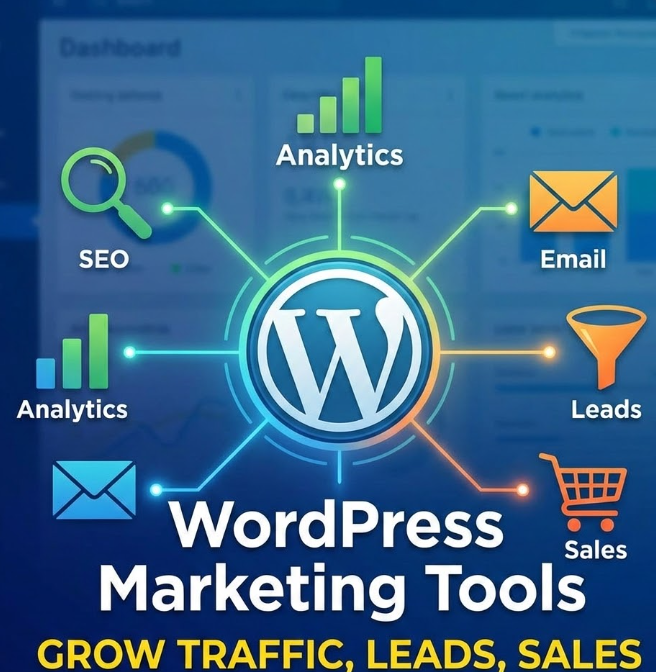
In today’s digital landscape, a strong online presence isn’t optional — it’s the foundation for consistent traffic, lead generation, and sales. The good news is that you don’t need a huge team or a complex tech stack to make it happen. With the right tools, you can build a marketing system that works in the background while you focus on your business.
That’s where WordPress comes in. As the world’s most popular content management system (CMS), WordPress gives you the flexibility to create, manage, and optimize your website — and connect it with the marketing tools that drive real results. From SEO and analytics to email automation and lead capture, WordPress makes it possible to grow faster without overcomplicating your workflow.
Why WordPress for Marketing?
Ease of Use
WordPress is popular for a reason: it’s easy to manage, even if you’re not a developer. You can publish content, update pages, install plugins, and adjust your design from a clean dashboard without touching code. This makes it a practical choice for marketing teams and business owners who want to move fast and stay independent.
Flexibility and Customization
One of WordPress’s biggest strengths is how adaptable it is. With thousands of themes and plugins, you can build almost any type of website, including a business site, a landing page system, a blog, or a full eCommerce store. You can also connect your site with tools for SEO, analytics, email marketing, and lead generation, so your website becomes a real growth channel, not just an online brochure.
Getting Started with WordPress
Before you start using marketing tools, you need a solid WordPress setup. The first step is choosing a reliable hosting provider, because hosting affects speed, uptime, and security, all of which directly impact marketing performance.
Many hosting providers offer quick WordPress installation and beginner-friendly dashboards. Once your hosting is ready, install WordPress, choose a theme that matches your brand, and set up the key pages (Home, About, Services, Contact). From there, you’ll be ready to add the marketing tools that help you attract traffic, convert visitors, and track results.
Read also: Top 10 Best WordPress Plugins for 2025
Essential Marketing Tools for WordPress
SEO Plugins
SEO is one of the most effective ways to grow long-term traffic without relying only on ads. A good SEO plugin helps you structure your pages correctly, improve readability, manage meta titles and descriptions, and avoid common technical mistakes that can limit your visibility in Google.
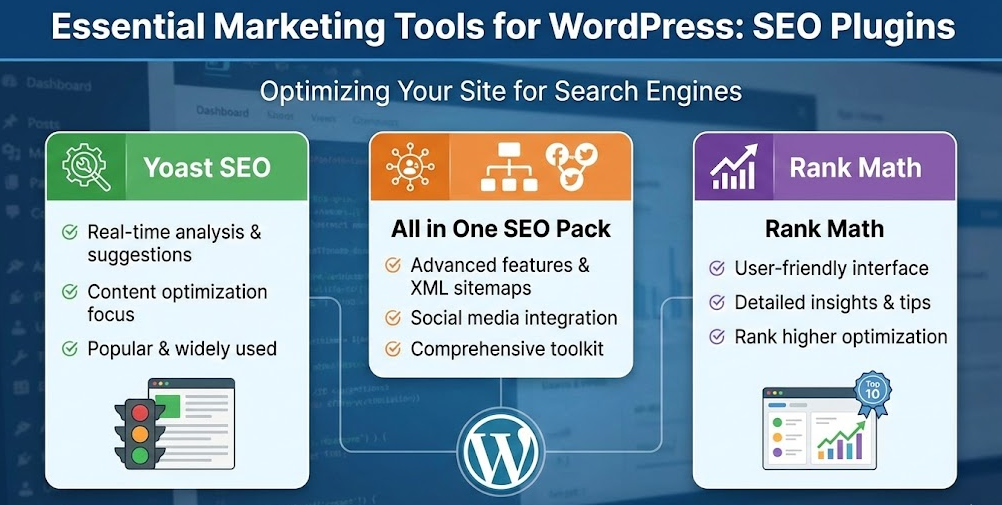
Here are three reliable SEO plugins for WordPress:
Yoast SEO:
A widely used option that helps you optimize content while you write. It gives clear on-page recommendations, supports meta tags, and makes it easier to control how your pages appear in search results.
All in One SEO (AIOSEO):
A strong all-in-one plugin with advanced features like XML sitemaps, schema settings, and social sharing controls. It’s a good choice if you want more flexibility without making the setup too complicated.
Rank Math:
A modern, user-friendly SEO plugin with detailed optimization tips and built-in tools for structured data, internal linking, and keyword targeting. It’s especially useful if you want more insights and control from the start.
Social Media Integration
Social media can be a strong source of traffic, brand awareness, and repeat visitors, especially when your WordPress site is built to support sharing and track what actually works. The goal is simple: make it easy for people to share your content, keep your posting consistent, and measure results so you don’t waste time.
Here are the key tools to connect social media with WordPress:
Social Sharing Plugins:
Sharing buttons help visitors distribute your content with one click. Plugins like Social Warfare and ShareThis let you add clean share buttons to blog posts and pages, and often include features like share counts and layout customization.
Scheduling Tools:
Consistency matters more than posting “a lot”. Tools like Buffer and Hootsuite help you plan and schedule posts in advance, manage multiple platforms, and keep your content promotion organized without logging in and out of every social network.
Analytics and Tracking:
If you’re investing time in social media, you need to know what brings traffic and conversions. Platforms like Sprout Social can help you track performance, engagement, and audience growth so you can double down on content that drives real results.
Landing Pages and Lead Generation
Landing pages are one of the fastest ways to turn website traffic into real business results. A well-built landing page keeps the message focused, removes distractions, and guides visitors toward one clear action, such as requesting a quote, booking a call, or downloading a resource.
Here’s how to build high-performing landing pages in WordPress:
Creating Effective Landing Pages:
Page builders like Elementor or Beaver Builder let you create custom landing pages without coding. Keep your layout clean, your copy direct, and your call-to-action easy to find. The best landing pages are not “beautiful” first, they are clear, fast to scan, and designed around one conversion goal.
Using Lead Generation Plugins:
Tools like Thrive Leads and Leadformly help you collect and manage leads efficiently. You can build high-converting forms, pop-ups, slide-ins, and multi-step lead flows. Many businesses also use interactive elements such as quick quizzes or calculators to increase sign-ups and qualify leads before the first contact.
Capturing and Nurturing Leads:
Lead generation does not stop at collecting an email address. Offer a simple incentive that matches the visitor’s intent, such as a checklist, a short guide, a free template, or a limited discount. After that, nurture leads with helpful email sequences, relevant content, and follow-ups based on what they viewed or submitted on your site.
Website Performance Tools
Website performance is not just a technical detail. It directly affects SEO, user experience, and conversion rates. If your pages load slowly, visitors leave faster, forms get fewer submissions, and your marketing campaigns become more expensive because you lose people before they even engage.
Here are the most useful performance tools to improve speed on WordPress:
Caching Plugins
W3 Total Cache:
W3 Total Cache improves performance by generating cached versions of your pages and reducing how often WordPress has to “build” the same content from scratch. This lowers server load and helps your site feel faster, especially during traffic spikes.
WP Super Cache:
WP Super Cache is a popular alternative that creates static HTML files from your WordPress pages. It’s simple to set up and can noticeably reduce load times for visitors, which makes it a great option for many standard business websites.
Image Optimization
Images are one of the most common reasons WordPress sites slow down. Compression plugins like Smush or ShortPixel reduce file size while keeping quality high. This helps pages load faster, improves mobile performance, and supports better results in Google’s speed metrics.
Read also: How to Create Google Analytics Dashboards in WordPress
Tools for Improving User Experience
User experience is a major part of marketing. Even the best content and the best ads won’t perform well if visitors struggle to navigate your site, read your pages on mobile, or wait too long for them to load. Improving UX helps increase trust, engagement, and conversions without changing your entire strategy.
Generating Unique QR Codes
QR codes are a simple way to connect offline and online touchpoints. By creating unique QR codes, you can send people directly to a specific landing page, promotion, contact form, or event page. This is especially useful for printed materials, business cards, flyers, and in-person campaigns, because users can access your content instantly from their phone.
Mobile Optimization
Most visitors browse on mobile, so your website should feel effortless on smaller screens. Choose a responsive theme, keep layouts clean, and make buttons easy to tap. Mobile optimization is not only about design, it also improves your SEO and reduces bounce rate.
Speed Optimization
Speed is one of the biggest factors in user experience. Beyond caching and image compression, using a CDN can improve loading times by delivering your content from servers closer to the visitor. This makes your site faster, more stable during peak traffic, and more reliable across different locations.
Tracking and Analyzing Performance
Marketing without tracking is guesswork. If you want to grow traffic, leads, and sales, you need to measure what visitors do on your site and which channels bring real results. WordPress makes this easier because you can connect analytics tools, monitor behavior, and improve your pages based on data instead of assumptions.
Setting Up Key Actions in Google Analytics
Google Analytics helps you track the actions that matter most, such as contact form submissions, quote requests, purchases, or newsletter sign-ups. Instead of focusing only on pageviews, track conversions so you can see which pages and campaigns are actually generating business outcomes.
Using Heatmaps
Heatmap tools like Hotjar and Crazy Egg show how people interact with your pages. You can see where users click, how far they scroll, and which sections they ignore. This is especially helpful for landing pages, because small layout changes often lead to better conversion rates.
Enhancing Security
Security is also part of marketing performance. If your site gets hacked, slows down, or goes offline, you lose trust, rankings, and potential customers. A secure WordPress setup protects your traffic and keeps your website stable.
Wordfence
Wordfence is a powerful security plugin that helps protect your site from malware, brute-force login attempts, and other common threats. It includes firewall features and real-time monitoring, making it a strong all-in-one option for many WordPress websites.
Sucuri
Sucuri is another trusted security solution that offers malware scanning, firewall protection, and security monitoring. It’s a solid choice if you want an additional layer of protection and more advanced security oversight.
Read also: 6 WordPress Squeeze Page Builders That Actually Increase Email Sign-ups
Recommended WordPress Marketing Stack (Quick Setup)
If you want your WordPress website to generate consistent traffic and leads, you need more than just a nice design. You need a clear marketing setup that covers the essentials: SEO, lead capture, analytics, speed, and security.
Below is a practical WordPress marketing stack you can implement step by step. It works for service websites, agencies, consultants, and even small eCommerce projects.
1) SEO (Search Visibility)
Your SEO plugin helps you control how your pages appear in Google and improves your on-page structure.
Recommended options:
- Rank Math
- Yoast SEO
What these tools help you do:
- write better meta titles and descriptions
- manage indexation and avoid SEO mistakes
- create XML sitemaps automatically
- improve internal linking and page structure
- add basic schema settings for better visibility
2) Forms (Lead Capture)
A form plugin is your main lead-generation tool. It turns visitors into contacts and makes it easier to collect inquiries, quote requests, and sign-ups.
Recommended options:
- WPForms
- Fluent Forms
What these tools help you do:
- create contact forms and multi-step forms
- reduce spam with modern protection
- connect forms to email tools and CRMs
- create conditional logic (show questions only when needed)
- build clean form layouts that work on mobile
3) Email Marketing (Follow-Up and Automation)
Email marketing is where most websites lose money. Many businesses collect emails but never follow up properly. A good email platform helps you automate communication and keep leads warm.
Recommended options:
- Mailchimp
- Brevo
What these tools help you do:
- build email lists and segments
- create automated sequences after sign-up
- send newsletters without manual work
- track open rates and clicks
- connect email campaigns with forms and landing pages
4) Analytics (Tracking What Works)
Traffic alone doesn’t matter if you don’t know what people do on your site. Analytics helps you measure real actions and improve marketing decisions.
Recommended setup:
- Google Analytics 4 (GA4) + conversion events
What you should track:
- form submissions
- clicks on phone numbers
- clicks on email buttons
- downloads of resources
- purchases or checkout steps (if applicable)
5) Performance (Speed and User Experience)
Speed affects SEO, user experience, and conversion rates. A slow website costs you traffic and leads, even if everything else is done correctly.
Recommended performance stack:
- caching plugin
- image optimization
- CDN
What these tools improve:
- faster page load times
- better mobile experience
- stronger Core Web Vitals scores
- lower bounce rate on landing pages
6) Security (Protection and Stability)
Security is not just a technical issue. A hacked or broken website can destroy trust, rankings, and business reputation. A security plugin helps protect your site and keep it stable.
Recommended options:
- Wordfence
- Sucuri
What these tools help you do:
- block brute-force login attacks
- scan for malware
- monitor suspicious activity
- improve firewall protection
- reduce risks from outdated plugins
Read also: Boost Your WordPress Site Speed: A Simple Guide
How to Choose the Right Marketing Tools for WordPress
Choosing WordPress marketing tools is not about installing as many plugins as possible. The goal is to build a setup that is stable, fast, and easy to manage. A smaller stack of well-chosen tools almost always performs better than a bloated website with dozens of overlapping plugins.
Below are the most important criteria to help you choose the right tools without wasting time or breaking your site.
1) Compatibility (Theme, Builder, and Other Plugins)
Before installing any marketing plugin, make sure it works with your current setup.
What to check first:
- Does it work with your theme without layout issues?
- Is it compatible with your page builder (Elementor, Beaver Builder, Gutenberg)?
- Does it conflict with your caching or security plugins?
- Does it support your current WordPress version?
Why this matters:
Even great plugins can cause problems if they clash with your builder or theme. This can lead to broken forms, slow editing, design bugs, or features that stop working after updates.
A simple rule:
If a plugin requires too many fixes to “make it work”, it’s not the right choice for your website.
2) Speed and Performance (Don’t Kill Your Website)
Marketing tools should help you grow, not slow you down.
What to look for:
- lightweight code and fast loading
- minimal scripts on the front-end
- no unnecessary animations or heavy pop-ups
- optimized database usage
- good performance on mobile
Why this matters:
A slow website loses visitors quickly. Even if you have strong SEO content or paid ads running, you’ll waste traffic if the site takes too long to load. Speed also impacts your Google rankings and Core Web Vitals.
Practical advice:
Avoid installing multiple plugins that do the same job. For example, don’t use three different tools for pop-ups, forms, and email capture if one platform can handle it properly.
3) Support, Updates, and Long-Term Reliability
A plugin is not a one-time purchase. It becomes part of your website’s system, which means it must stay reliable over time.
What to check:
- frequent updates (not once a year)
- active support and clear documentation
- good reviews from real users
- a history of stable performance
- a professional roadmap and product development
Why this matters:
WordPress evolves constantly. If a plugin is outdated, it can become a security risk, break after an update, or create compatibility issues with new versions of PHP, themes, or builders.
4) Pricing and Real Value (Pay Only for What You Need)
Some paid tools are worth it, but not every “Pro” version is necessary.
What to focus on:
- does the free version cover your basic needs?
- are you paying for features you will actually use?
- can one premium tool replace several small plugins?
- does it save time or increase conversions enough to justify the cost?
A good approach:
Start with the free version, validate that the plugin fits your workflow, and upgrade only when you clearly need advanced features like automation, integrations, or detailed reporting.
Final Thoughts
WordPress gives you everything you need to build a marketing-focused website that attracts traffic, captures leads, and turns visitors into customers. The key is not to install dozens of random plugins, but to create a clean system where each tool has a clear purpose.
Start with the essentials: SEO, analytics, lead capture, and performance. Once your foundation is stable, you can scale your marketing by improving landing pages, adding smarter automation, and tracking user behavior more precisely.
If you want to move faster and avoid technical issues, it’s often worth working with a team that can handle both strategy and implementation. Whether you need Web Development for a stronger website structure, Google Ads Setup to drive targeted traffic, or Website Maintenance to keep everything secure and running smoothly, the right setup will save you time and help you grow with confidence.