















Productoverzicht: het complete platform voor luchthavenvervoer en taxi-dispatch
De oprichter van CodiCo presenteert het volledige aanbod: dispatchsoftware, boekingsformulier, betalingen, facturen, zones, affiliates, websites, mobiele apps en de eigen server die elke klant krijgt.
Dit zie je in deze video
Klik op een tijdstip om de video vanaf dat moment af te spelen.
Transcript van de video
0:01Hello everyone, my name is Ardum. I am the founder of CodiCo. Our company has been operating since 2013, and we are experts in areas like website development, UX design, mobile app development, custom CRM and ERP systems, professional Google ads setup and support, and business integration with AI solutions that help automate many processes, reduce costs, increase revenue. In this video, I want to tell you about our taxi dispatch product, which we’ve been developing for 5 years, which we continuously improve based on the experience of our partners, some of the largest transport and taxi companies in Europe. I want to tell you about its benefits, how it can help you, what business problems it can solve, compare it with competitors products, small presentation to show all its features. And let’s start with a short presentation.
1:11We switch to the admin panel and immediately see detailed stats where you can view all info about receipts, order numbers, which orders for what I my for which cars, rejections, commissions. All this can be selected for a specific period. When developing and improving our system, our main goal and priority was automation. We noticed that many clients and partners spend a lot of time on daily processes that take up almost 60% of their time and prevent them from focusing on important things like their business and customer orders. Instead, they have to manually change order details if a client requests, manually calculate commissions from partners for completed orders, enter data in third party products or systems, or even on paper to track orders given to partners so they don’t forget to collect the later.
2:22issuing invoices, spending time on order cancellations and refunding clients takes a lot of time and there are many such examples. So in our system we focused on automation to simplify all these processes so they happen automatically and you spend as little time on them as possible and the system handles it perfectly while you focus on growing your business and making more. money, including automatic selection of the best driver for the order. We have automatic commission calculation, automatic invoice generation for commission payments between partners, meaning the system knows who owes whom, which partners you gave orders to, and from which partners you received orders. It manages all this itself, automatically calculates at the end of the month, and issues invoices for payment. It automatically changes order statuses depending on the order’s position in the workflow and much more. Another important aspect for us was the booking form. We conducted a deep analysis of our partners’ work, our competitors booking forms, monitored behavioral factors, and discuss the booking process
3:45with clients. asking what was convenient and what was not. So it was a big deep work after which we concluded that a complex booking process drives away clients and you just lose them because you have an inconvenient booking form because they didn’t understand something or couldn’t enter something. For about a year with our experts, we worked on the booking form to make it as convenient and comfortable as possible for our clients. So everything was easy to understand. Let me give you an example, please. Here is a sample of our booking form. Here is also a tab for delivery. So our system supports three types of trips. It supports airport transfers, city taxis and delivery. And here, as you can see, everything is simple. So, you start entering addresses. The system suggests available addresses. You just need to select from the list. Choose the date and time. You move to the second step. The system offers a suitable car based on luggage and passengers, shows
5:06your route on the map, and lets you choose other available cars. If you choose a car with more seats and luggage space, then automatically all other cars with less are no longer highlighted. So the user understands these cars are no longer suitable. Also, you can edit and change the pickup location, drop off location, date, and time without leaving the step. So you don’t need to go back to the previous step to change something. Here you can also select and specify additional data such as child seats, pet transport, extra stops, airport meeting, waiting time, or leave your own comment. Enter your personal data, your name, your email, your phone number.
5:54Choose the desired payment method and click the book button to place an order. As you can see, just two steps. Everything is simple. Everything is convenient. Plus, various currencies are supported. So, the user can change the cost to their currency on the fly to make it easier to understand the pounds. You can easily switch to dollars, see how much it will cost in dollars. And you can also change the language. Switch, for example, on the fly to French. change the language to German or switch back to English. All this is done easily. All this is simple and all this is aimed at maximum comfort for the user. So it is as easy as possible, as convenient as possible to place an order and so you lose as few potential clients as as possible. So there is no blocking factor that repels.
6:54Another big advantage of our system is the unique division system meaning a unique country system and using our platform you can work simultaneously in several countries. As we can see in this platform in this demo we have added almost all countries meaning the system works simultaneously in all these countries and you can view information for each country separately meaning you can view information for all countries at once. For example, orders for all countries or you can view orders only in a specific country. Specifically in Belgium, there are four orders waiting for assignment. And for all countries, there are also four orders. Maybe a bad example.
7:42Meaning each country has its own orders, its own drivers, its own partners, its own prices, its own cars, its own settings, and even its own billing, your billing details, your payment data. So we have a billing info section where you can add your companies, add your billing data and add your stripe keys, connect your stripe keys and thus you can choose for example in Belgium I want my clients to pay this company on this Stripe account and the invoice should indicate these billing details. And in Germany, I want a different company with different billing details and money from my passengers to go to a completely different Stripe account. In our system, this is possible. In each country you work in, you can configure a specific payment gateway. We also have a wellthoughtout order management process.
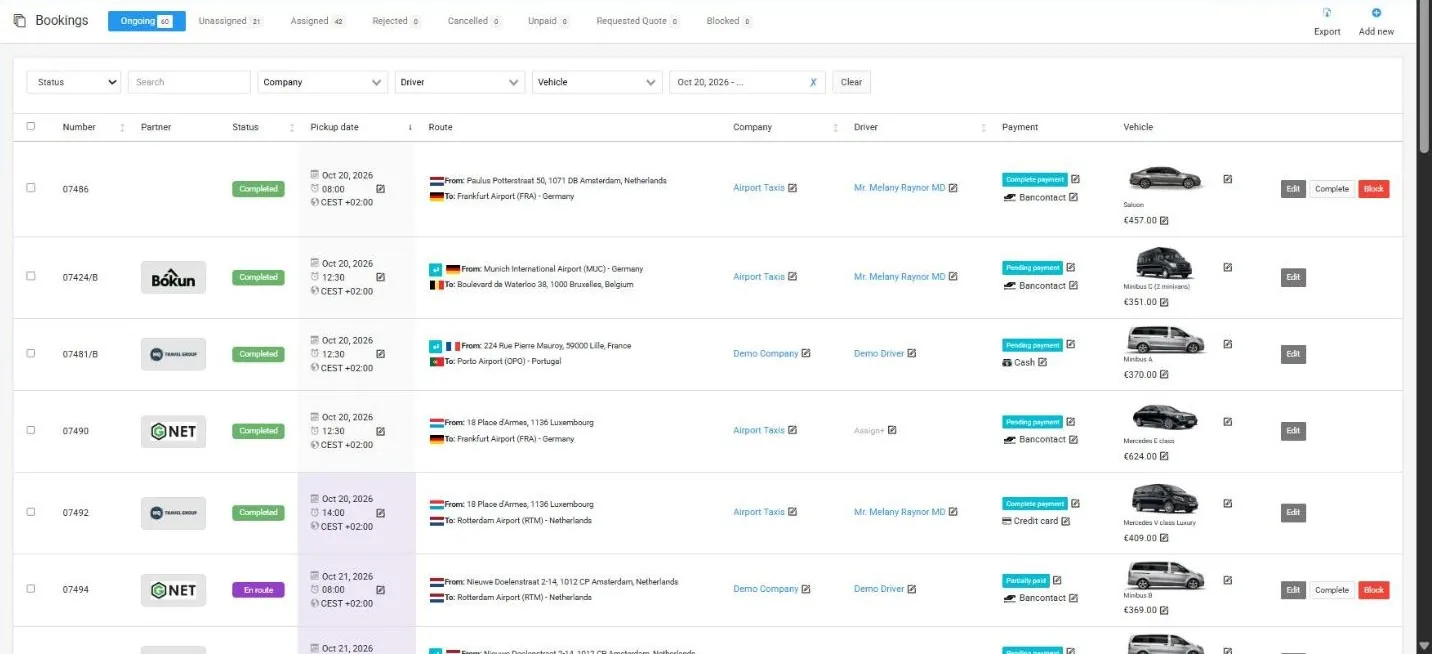
8:44We have two models for working with orders. We have a manual model and an automatic one. In the case of the manual model, all orders go to the booking section on the pending tab and you yourself by clicking the assign button. Choose the taxi company whether it’s your company or a partners. So you can create a small community with your partners and you no longer need ask if they can take an order if they’re available or not. You don’t need to send your orders and write in WhatsApp groups. Just add all your partners here in the companies section. And after that, if if you can’t take an order for some reason, you can easily pass it to your partners.
9:29You might even have a priority partner who gets the order first. The priority partner takes it, will fulfill it, and if they decline, the system can automatically send the order to all your other partners, and whoever takes it first will fulfill it, and you’ll just get your commission. Convenient. I think it’s very convenient. Just one button press. No need to call anyone. No need to sit in any WhatsApp groups. press one button and that’s it. And the order goes to all your partners and you just wait for it to be completed and get your commission. So in the case of manual assignment, you press the assign button and choose which taxi company to assign it to. Then it assigned tab. This means the order is assigned to a company and the system is waiting for a decision from that company. So the company has limited time to make a decision. Let’s say you set a limit of 5 minutes or 10 minutes or half an hour. You decide what limit to set. So within this time your partner or the company you assign the order to.
10:38If you can’t whether to take the order or not. If they take it, the order goes to them. Moves to the job section. This means the order is accepted. Assigned to a taxi company. A car and driver are assigned so the order is fully ready to go. Or they can decline it, in which case the system will find another company, send it to the next company or broadcast it to all your companies, and whoever takes it first will work with it. There are also tabs for declined, canceled, unpaid orders, city taxi orders, delivery orders, request acquired orders, share transfer. These are orders where passengers in our system can agree to a shared ride. And if two orders meet the conditions and both clients agree to share their ride, the system will combine their trips into one car. So each passenger gets a nice discount. And instead of sending two cars, you send just one. And such orders go to the share transfer section. And the last tab is blocked.
11:54These are blocked orders. So surely you’ve encountered situations where you gave your project to a partner or assigned it to a driver and the driver didn’t show up for some reason. And for one reason or another, the driver didn’t pick up the client. So not only should he not receive a commission for this order, but he might also face penalties because the client ordered a taxi at their own expense. And you have to cover these client expenses. In this case, you can block the order, thereby telling the system that no commission will be paid for this order. Plus, during the block, the system will also ask if you want to impose a penalty on the driver for this order. And you decide what penalty to impose. Regarding commissions and all payments, we have a section called invoices where all payments are recorded. These are demo data I’m showing you. In our system, all payments are recorded. Whether it’s a payment from a client for a booked trip, payments with your affiliates, partners, or commission payments. The system automatically calculates commissions for payment. When you assign give it your orders, an order you can’t fulfill, you give it to one of your partners.
13:21With this partner, you have a fixed rate, for example, 20%. The system already knows this and automatically calculates with each of your partners. It automatically calculates and records which orders were transferred to them and for what amounts what your commission will be, what their commission will be, and so on. At the end of the month, you or your partner just click the generate invoice button, and the system creates a reconciliation invoice. Here’s an example. A list of my companies and demo company has a commission button. If I go in, I see that I transferred three orders to this company. One of them, by the way, is a round trip. Here are the costs of these orders. Here are the commissions I should receive for giving these orders to this company. This is my commission.
14:10Here’s how much the company itself should take. It shows how much was paid in cash, how much was paid online. And this is the invoice creation button. By clicking it, the system will automatically reset the list, create an invoice, and display it in the payment panel. And it will automatically assign it based on payments, determining who owes whom, and assigning it to the appropriate person. The next thing I want to tell you about is our unique flexible pricing system. This is, let’s say, one of our prides. There’s nothing like it. Thanks to this tool, you can very flexibly set prices exactly as you want. So, I’ll start by saying, as I mentioned earlier, we have divisions.
15:04These are the countries where you operate. In the zone section, you can divide these countries into small or any zones you like. Let me show you an example. Using this tool, you can outline any country, any shape on the map and save it. For example, we outlined Brussels. Belgium. Yes, sorry. We outlined Belgium. Here it is. All of Belgium now. And we saved it as the Belgium division. This is our country, Belgium. Now, we divide this country into zones convenient for us. I’ll switch to the zones tab. And you see here a list of all available zones. For example, the Brussels zone. Here you go. This is exclusively Brussels.
15:51Antworp zone. Here you go. Brussels airport zone. Here you go. Bruge zone. Here you go. And you can create countless zones. You can create zones however you like, as you want. You can make them for small towns, villages, tourist spots, airports, train stations, resorts, hotels, districts, however you want. You can create as many zones as you need. And then using these zones, you can set prices for trips for your car prices. For example, we’re in the Belgium division. Let’s look at an example of setting zones for a salon car for a sedan type. If we go into its settings, the first thing we see is the basic settings for the car. These are the settings and prices that will be applied in the system by default. By default for airport transfers, we have three passengers, two pieces of luggage, and two carry-ons.
16:59But we also have two other available tabs. This is city taxi. So by switching to city taxi you can set completely different meaning for transfers for airport transfers you might have one set of settings and prices and for city taxi you might have completely different prices and settings and accordingly the last tab is delivery but as we see it’s not active for this type of vehicle meaning delivery on a sedan is not possible but it has its basic settings let’s look at what’s included in the basic settings. In the basic settings, we see that we can hide our prices and enable the buy request option. So, the user will request a trip price and we will send it to them. We also have a base price per km, €1.7 per km. We have a price per minute of travel. We all know that the same route can take different amounts of time.
18:01For example, 10 kilometers on a straight good road can be covered in about 10 minutes. And the same 10 kilometers in the city center or on a winding road or in the mountains or with heavy traffic and many lights can take up to an hour or more. And for you, that’s a loss of time and money because the driver spends more time on one trip and can’t start another. So, you lose money. That’s why we have an option for the cost per minute of travel. You can use it or not, but it allows you to charge a small time. So, the faster the driver reaches the destination, the cheaper the order costs for the client. The longer it takes, the more expensive the order will be. The next option is the cost per kilometer depending on the trip length.
18:55If the order is over 100 km, the rate will not be 1.7 per km but 1.5 as indicated here. And you can add more. For example, if over 200 km, it could be 1.1 and so on. Similar settings for return trips. For return trips also based on 1.7 per km. If the trip is longer than 100 km, it will be 1.5 and so on. Plus, you can add a discount for return trips. Many companies want to offer their clients a discount on return trips if they book a round trip. In our system, this is possible. We also have a waiting fee, a minimum standing fee, and a minimum price. Meaning, even if the order is less than your specified minimum price, the system will still charge your client the minimum price.
19:53We have additional stops along the way. When there’s an additional stop, the route is recalculated considering the additional stop, plus a fee is added for this service. We also have prepayments if the client chooses to pay in cash. We’ve all encountered situations where a client ordered a trip, chose to pay in cash, and didn’t show up to meet the driver. The driver spent time, went to the airport to meet them, and the passenger just left. All because we weren’t protected as the payment method was cash and the nothing to lose. Using this option, you can charge the client a small or any prepayment you want. The prepayment can be fixed, like a fixed amount, for example, €20 or a percentage.
20:51For example, it could be your commission like 20% commission. The system will automatically ask the passenger to make a prepayment. When choosing the cash payment method in the amount specified by you in the system, what do we have next? Next, we have vehicle parameters. As I mentioned, it’s the number of passengers the vehicle can hold. The system won’t allow a a vehicle if the number of passengers exceeds the limit or if the luggage exceeds the limit. The system takes all this into account. Additionally, we have additional services where you can specify their cost. We have day and nighttime meaning the price for day trips can differ from night trips.
21:44For example, night trips might be more expensive. Here you poo. Time starts and ends. Choose the payment type, how the difference will be calculated, and set your day and night prices for each day. Additionally, we have vehicle availability. Here you can select zones. And we’ve now reached the zones we discussed before starting the pricing presentation. You create these zones and now you can work with them. Now you can choose for example in the Brussels zone I don’t work or in the Brussels zone I can only drop off or in the Brussels zone I can only pick up passengers but not drop them off. Or for example in the Brussels zone yes I work perfectly. I can both drop off and pick up passengers. This is very convenient for places that are taxifree so-called taxfree zones.
22:41You can set up such zones and say that we can only drop off passengers there and we can’t take orders from them. Another useful option is period pricing. We all know that during holidays trip costs usually increase or on certain days when summits or global events occur like the recent Olympic games in France and so on. In this case, you can set periods and specify different trip costs during these periods. For example, during Christmas holidays, your base rate will not be 1.7 but €2 per kilometer. This is also possible. And our main setting, our pride, which we spend a lot of time on, but but which gives you maximum control over costs and pricing settings, is the pricing between zones.
23:43Here you can specify your special prices for trips between zones. So we remember we created zones and now we can work with them. For instance, a trip from Brussels to Antworp both ways meaning there and back. Whether from Brussels to Antworp or Antworp to Brussels, it doesn’t matter. And here you see the same form you filled for basic prices. But here roughly speaking you say I have base rates but if the trip is from Brussels to Antworp or from Antworp to Brussels use these rates here the price might not be 1.7 per km but €3 per km. The return trip is also not 1.7 but 2.5 for example per km. The minimum price here is not €50 but €100. Or you can set a fixed price, meaning you said is fixed and say any trip from Brussels to Antwerp or Antworp to Brussels costs €200. That’s all. If someone orders a trip from these zones, the system will charge €200. Besides all this, you can adjust the cost for additional services.
25:05You have a base cost for additional services. And for special zones, you can set special prices for extras services. If a child’s seat costs €5 everywhere, but in these zones, you want it to cost €10. Here you can only for special zones. Set your prepayment for cash payments. if prepayment. But in these zones, you want a prepayment of €20 or 20% only in this zone, while in others you don’t. For these zones, you can also set your day and night prices. For these zones, you can even set which payment methods you want to accept for trips. For example, from Brussels to Antwerp or Antworp to Brussels. I don’t want to work with cash. I won’t accept these payments. Just uncheck the box and the system won’t offer users the option to pay in cash in these zones. Isn’t that very convenient? As you can see, there can be tons of such settings in our system. In the demo, there are already such basic settings.
26:18You can even choose any, which means from any place. If I remove Brussels, any will be set. From any place to Antworp, I have a fixed price €150. Just as an example, it means from any place, as you can see, from any place to CDG airport in Germany. From any place in Belgium to CDG airport in Germany, the price is €3 per kilometer with a minimum cost of €60. From BRU airport to Antworp, the fixed price is €85. From BRU airport to Gent, the fixed price is €130. From the airport to anywhere, the rate is €1.5 per kilometer with a minimum cost of €50. Anywhere to any point in the world or anywhere in Belgium. It all depends on how you want to set it up. very flexible tools allowing you to set everything exactly as you want. The next important point which we are also proud of is our referral program. If you go to your widget settings here, you can see your referral link QR code. This is very convenient
27:34when working with hotels with travel agencies. When working with some event agencies, organizing events, summits, and so on, you can create your page, place a widget on it, generate your QR code with this referral link, print it, and place it at the reception desk of a hotel. People will come, scan it, you will receive a new stream of orders, and the hotel will receive its commission from each order. The hotel can manage its commission itself, meaning you can set a base commission for it, for example, 10%, by agreement with you, you can allow the hotel to manage its commission independently, meaning it can set it increase it to 30 to 50, even 100% commission. All this will be added to the order cost, meaning the system will increase the order cost, but these will be your referrals problems. How to make their clients place an order? If they can do it, why not pay them a 100% commission if you get your money anyway? Each user has referral links, meaning any user of your system will have their referral link, will have their personal QR
28:50code. Thanks to referral links, they can share them with their friends, they can share them on social networks. There are quite active people. This will be another additional stream of clients for you. from each client. Yes, they will receive their commission, their percentage, which again will be added to the order cost. You will receive your income anyway and they receive their commission percentage and everyone benefits. Here you can find the code to place the widget on a website. Anyone can place it if they have their own website. For example, a hotel. A hotel has its own website and it wants to place a taxi booking widget on its site. Here it is the ready code. Just two lines that need to be placed anywhere on the site where you want to have such a widget which I showed you earlier. And in this place your widget will appear.
29:45As for the referral program, we also have affiliates. They have their personal accounts. We have partners. Finally, I wanted to tell you about additional pleasant features that also contribute to increasing conversion because they provide convenience for clients. It’s multilingual support which inside the system in the accounts of your taxi partners all these languages will also be available and in personal accounts. Your clients will also have all these languages available. The system is fully translated. Just choose a language and the system automatically as you can see switched to French. Meaning changing it to German automatically translates the system completely to German. Please I can switch. Everything is in German.
30:36Everything is already translated and ready. I can switch for example to Italian. Everything is in Italian. I can switch back to English. Everything is in English. So we have full multilingual support both within the system and let me remind you within the widget itself and even in the widget it all happens on the fly. So you choose a language and the system instantly translates to another language in a fraction of a second. The next feature I would like to talk about again is multicurrency. So the currencies are already available in the system. Plus you can always add new currencies. Meaning we have a currency section where you can go add your own currency, specify its name, its threelet code, specify its symbol and you can also set the rate you prefer for the system to calculate conversions at that rate. Or you can leave this field empty.
31:37We have integration with an online service. If you leave the field empty, the system automatically takes the rate from this online service. Additionally, we have integration with Google calendar. Let me show you this section. Here’s the calendar section. Currently, my integration is not set up. I haven’t specified the key, but in this section, you can integrate with your Google calendar, and accordingly, you will be able to see all orders in your Google calendar. If there are any changes to an order, it will also change in Google calendar. If a new order appears, it will automatically be added to your Google calendar. So full synchronization with Google calendar and we also have a notifications. Let me just move this.
32:26A whole range of notifications received by the system administrator, taxi companies, drivers, and clients. Here you see the full list of all available notifications in our system. As you can see there are quite a lot and they are all available in different languages meaning for each language. Four user credential i.e. when a user registers they receive this kind of email i.e. Welcome to our taxi service. Here are your credentials. And translations are immediately available in all languages. And this is the case with every type of email. And as you can see, there are countless emails here. Of course, I can’t tell you everything in this video because it would take more than an hour. There are so many features. In this video, I have shown and told you only about the key points.
33:24We also have things like deferred payments, meaning the system will automatically not issue invoices for a client, not require payment for each order, but at the end of the month, it will sum everything up and send one invoice for the total payment. This is very convenient when you work with companies that place orders for their employees and it’s inconvenient for them. It could be 10 orders a day, for example. Yes, it’s inconvenient for them to pay for each order immediately. It’s much more convenient for them to receive just one total invoice from you at the end of the month. So, we have this option. The system supports this, meaning the system will automatically keep track of all orders and just create one total invoice at the end of the month, which it will send to the client and request payment for the total amount. So, we have this and much much more. But unfortunately, our time is limited, so I can’t show you everything.
34:23I can’t in this video recommend you visit our YouTube channel where you’ll find even more useful videos about the features of our system, how to set it up, and how to configure various options. On our YouTube channel, you can find much more useful information about other available options. Additionally, we have detailed documentation about our system. All of this can be found on our website. On our product page, there’s a resources section where you’ll find links to documentation, video tutorials, our Facebook group, and our blog articles. We publish helpful articles several times a week that can help your business grow, improve, and offer some advice. Moreover, you can even take a live demo. Just provide your name and email and you’ll enter the same system I’m showing you now. It’s simple. Just provide your name and email and you’ll enter the live demo to explore the system. Try it out and examine each option in detail and see all its
35:42capabilities. There’s access to the admin panel, your company profile, taxi company partner, and passenger profile client profile. Finally, I’d like to show you the process of acquiring our system by going to our product page at CodiCo.io.taxispatch Taxi dispatch software. Reach our product page. Here you can get more information about our product, its options, integrations, and capabilities. Also explore available resources and learn about the services our company provides besides the product. Check out the demo and of course view prices and purchase our product. By the way, the page is available in four languages. You can choose any language convenient for you. By clicking start, you’ll go to the wizard page where the system will ask you to choose one of the offered plans.
36:44Either a monthly plan for €7 a month or an annual plan for €770 a year, giving you one month free. Additionally, you can immediately choose a mobile app. By choosing mobile apps for passengers and drivers, available in iOS and Android versions, you also get the source code for these apps. The cost of mobile apps is €800. It’s a onetime fee, so you won’t need to pay for mobile apps again. This one-time payment includes the mobile apps, the source code you can download after purchase, and our active help in publishing these apps. Our specialist will help you assemble these apps. It will be a fully white label app with your company name and color scheme. Our specialists will help change, configure, assemble your app, and publish it in your App Store and Google Play development accounts.
37:45developer accounts. The same applies to the system. After purchasing the system, your logo will be everywhere. Instead of airport app, your company name will be everywhere, making it a fully branded system for you. Returning to purchasing the system by clicking view price, you’ll go to our wizard page. Choose the plan you like suitable for you and click next. and proceed to the next page where the system asks you to choose a location for your server. We provide each client with their own dedicated server on this server only your platform and nothing else ensuring you maximum performance and data protection. So please don’t worry about your data being lost. All data is encrypted. Don’t worry about data being passed to third parties or other companies. Everything is completely confidential, stored on your separate dedicated server and everything is encrypted. A separate server also allows for individual settings. So if your business grows tomorrow and you need a new option, integration or setting not in our system, our specialists can easily make it as a separate job.
39:12All thanks to the dedicated server. Each client has their personal server and our specialists can implement these individual settings and improvements for you. After choosing the location in step two, click next. And here you need to specify how it will be named. We provide a third level domain and you’ll need to specify your company name. The system will automatically give you a thirdle domain to work with while setting up your system, filling in your prices, etc. You can use the domain provided by us, a thirdle domain. Once everything is ready, you can easily and freely change it to your own domain in the future. You can launch the system, set it up, and launch it under your own domain, making it completely essentially your product.
40:04Yes, it will look like it’s under your domain with your logo, company name with no mentions of our service or any other companies. Let’s call it Taxi Dispatch. In the next step, you’ll need to create access for your administrator under which you’ll manage the system. Here you should specify your email and create a password for your administrator to manage this system. In the penultimate step, you’ll need to specify your company logo. Here I specified our company logo. And finally, in the last step, you’ll need to log in or if you don’t have an account, you’ll need to register. And after logging in or registering, a payment form for product will be available. After making the payment, the system will automatically redirect you to your personal account where you’ll see the creation process with loading. and you’ll visually see the process of creating and setting up your server and your own system. I want to clarify that this process can take 10 to 15 minutes while the server is set up and your platform is deployed. So, please don’t worry.
41:27This process will take 10 15 minutes. That’s about it. Yes, that’s about it. Please don’t hesitate to contact us if you have any questions. Again, I recommend subscribing to our YouTube channel where you can find many useful videos about our product video guides. We also create and add new videos every week that might be useful to you. Follow us on social media. If you have any questions, you can always contact us using the WhatsApp ask button.
42:12Our managers will gladly answer all your questions and help you with any issues or problems. Thank you all. Have a great day. Goodbye.