


 Subscribe

Not long ago, a business website could be simple and still do its job. A homepage, a few service pages, a contact form, maybe a blog. If it looked professional and loaded without obvious problems, many companies considered it “good enough”.
In this article, we’ll look at 11 web trends that will shape business websites in 2026:
- 1. AI-assisted website experiences
- 2. Website automation behind the scenes
- 3. Personalized user journeys
- 4. Interactive tools instead of static pages
- 5 .Performance-first web design
- 6. Accessibility as a default standard
- 7. Privacy-first analytics and smarter tracking
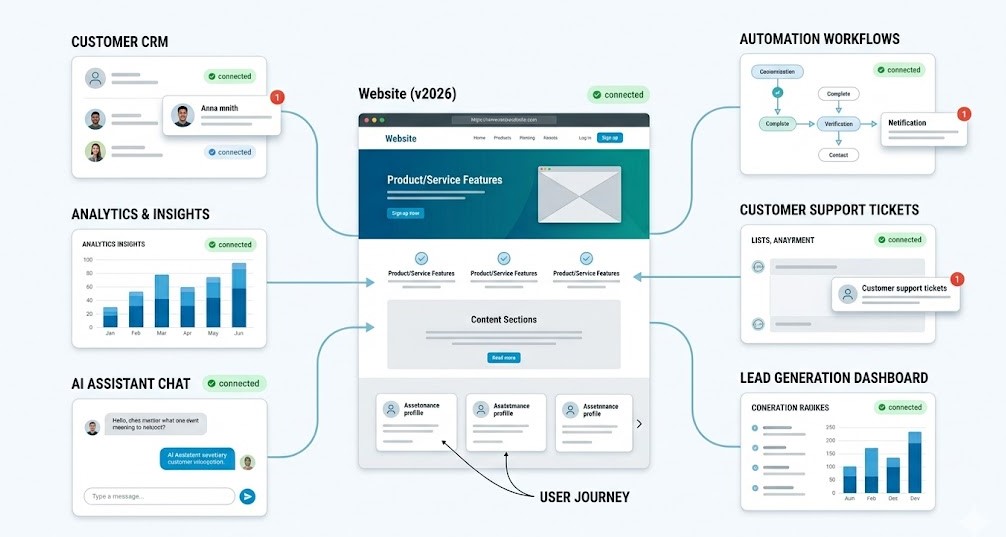
- 8. Connected websites as business hubs
- 9. Scalable design systems and reusable components
- 10. Storytelling through UX, content, and motion
- 11. Sustainable and lightweight websites
These trends all point to the same shift: in 2026, the old standard for business websites feels outdated.
A modern business website has to do more than explain who you are. It needs to support the way people actually make decisions online: quickly, carefully, often from a mobile device, and usually while comparing several options at once. Visitors expect clear information, fast loading, useful interactions, simple forms, trustworthy design, and a smooth path from interest to action.
This is why the future of business websites is not only about visual trends. It is about building websites that work harder behind the scenes.
A strong website today can help a company collect better leads, automate repetitive tasks, connect with CRM and marketing tools, personalize the user journey, improve analytics, and turn more visitors into customers. It can support sales, customer service, booking, eCommerce, content marketing, and internal workflows. In other words, a website is becoming less like a static online brochure and more like a digital growth system.
That shift matters for every business planning a redesign, a new WordPress website, a WooCommerce store, a booking platform, or a custom web solution. The question is no longer just “Does the website look modern?” A better question is: “Does this website help the business grow, save time, and serve customers better?”
The web trends shaping 2026 all point in that direction. AI, automation, personalization, performance, accessibility, privacy-first analytics, and connected systems are not separate ideas. Together, they define what business websites are becoming: faster, smarter, more useful, and more closely connected to real business goals.
Why Web Trends Matter for Businesses in 2026
Web trends are not only about how a website looks. For businesses, they are about how users behave, how quickly they make decisions, and how easily a website turns attention into action.
In 2026, visitors expect a website to answer their questions faster. They want clear navigation, mobile-friendly pages, useful content, quick loading, and a simple next step. If the website feels slow, confusing, outdated, or disconnected from what they need, they usually do not wait. They compare another company.
That is why these trends matter. AI can help users find answers faster. Automation can reduce manual work after a form submission. Better analytics can show which pages actually bring leads. Accessibility can make the website easier for everyone to use. Performance can directly affect trust, SEO, and conversion.
The main point is simple: a business website should not be treated as a one-time project. It needs to be improved, measured, and adjusted as customer expectations change.
The companies that benefit most will not be the ones adding every new tool. They will be the ones choosing the right improvements for their goals: better leads, faster sales conversations, fewer manual tasks, stronger trust, and a smoother customer journey.
1. AI-Assisted Websites Will Become the New Standard
AI is becoming a normal part of how business websites are planned, managed, and improved. It is no longer only about generating text or adding a chatbot. The stronger use case is more practical: helping users find answers faster, supporting customer service, improving search, preparing content drafts, personalizing offers, and reducing repetitive work for the team.
Another important shift is the rise of AI agents. Instead of only answering questions, these systems can help users complete small but useful actions on the website: choose the right service, prepare a quote request, suggest a suitable package, collect the first project details, or route the enquiry to the right team. For business websites, this makes AI more practical because it supports the next step, not just the conversation.
For a business website, AI should solve a clear problem. If visitors ask the same questions again and again, AI can guide them to the right answer. If a company has many services, products, or knowledge-base pages, AI can make information easier to find. If a team spends hours rewriting similar content, AI can speed up the first draft while people keep control over accuracy, structure, and tone.
The risk is using AI too broadly. Generic AI content can make a website sound empty. A weak chatbot can create more frustration than value. The goal is not to make the website look futuristic. The goal is to make it more useful.
In 2026, the best AI-assisted websites will not stand out because they mention AI everywhere. They will stand out because users get what they need with less effort.
How to bring it to life on your business website
Use AI where users get stuck.
Look at the points where visitors slow down: service selection, pricing questions, product comparison, booking details, support requests, or technical explanations. These are better places for AI than a generic chatbot that answers everything poorly.
Improve search and guidance.
If your website has many pages, AI can help users find the right service, article, product, or answer faster. This is especially useful for websites with large blogs, knowledge bases, documentation, service categories, or eCommerce catalogs.
Support content, but keep human review.
AI can help prepare first drafts for FAQs, landing pages, product descriptions, email flows, and support content. Still, every important page should be reviewed by a real person. Accuracy, brand voice, examples, and trust signals matter more than speed alone.
Connect AI with real business logic.
Strategic AI Integration works best when it is connected to user intent, website structure, CRM data, forms, or internal workflows. Instead of adding AI as a separate feature, businesses can use it to qualify leads, suggest the next step, support customer service, or reduce repetitive admin work.
Keep the experience quiet and useful.
The user does not need to notice every AI feature. They should simply feel that the website is clearer, faster, and easier to use.
2. Website Automation Will Move Behind the Scenes
A business website should not only collect information. It should help move that information to the right place.
This is where automation becomes important. When someone submits a form, books a consultation, downloads a file, or places an order, the website can trigger the next step automatically. The lead can go into a CRM. A sales task can be created. A confirmation email can be sent. A booking request can sync with a calendar. A WooCommerce action can start a follow-up email sequence.
For the visitor, the experience feels simple. They take one action and receive a clear response. For the business, the website quietly reduces manual work and keeps the process organized.
The real value is not in automating everything. It is in removing the small delays and mistakes that happen when teams copy data manually, forget to follow up, or lose context between tools.
How to bring it to life on your business website
Connect forms to real workflows.
A form should not only send an email to a shared inbox. It can route the lead into a CRM, assign it to the right team member, create a task, and send a confirmation message to the user.
Use smart logic in forms and booking flows.
Show different fields based on the user’s choices. A service request, quote request, consultation booking, and support enquiry should not all follow the same path.
Build visibility into your sales process.
For growing companies, a basic contact form often becomes too limited. With Custom CRM Systems, website enquiries can be organized by status, priority, source, customer history, and next action.
Automate follow-ups, but keep the tone human.
Confirmation emails, reminders, and next-step messages can save time, but they should still sound clear, helpful, and personal. Automation works best when it removes friction without making the business feel distant.
Related Article: WordPress Marketing Tools: How to Grow Traffic, Leads, and Sales
3. Personalized User Journeys Will Replace Generic Website Paths
A generic website treats every visitor the same way. Everyone sees the same headline, the same call to action, the same form, and the same path through the page. That may be simple to build, but it often misses how people actually make decisions.
A first-time visitor may need trust signals and a clear explanation of the service. A returning visitor may be ready to compare pricing, book a call, or complete a purchase. A B2B client may care about process, reliability, and long-term support. A private customer may want speed, clarity, and a simple next step.
Personalization helps the website respond to these differences. It can show more relevant content, adapt calls to action, suggest useful products, or guide users toward the right service. The goal is not to make the website feel like it is watching the user. The goal is to make the journey feel more relevant.
In 2026, personalization will matter because users have less patience for vague pages. If the message does not match their intent, they move on quickly.
How to bring it to life on your business website
Segment visitors by intent.
Start with simple differences: new visitors, returning users, service leads, product buyers, B2B prospects, local customers, or users coming from a specific campaign. Each group may need a slightly different message or next step.
Create dedicated landing pages.
Instead of sending all traffic to one general service page, build pages around specific services, industries, locations, or customer problems. A focused landing page usually feels more relevant than a broad page trying to speak to everyone.
Adjust calls to action based on context.
A user reading a beginner guide may need “Learn more” or “Compare options”. A user on a pricing or service page may need “Book a call”, “Request a quote”, or “Start your project”. The CTA should match the stage of the journey.
Use personalization carefully.
Personalized offers, popups, and recommendations can work well, but they should not feel aggressive. Avoid interrupting the user too early. Let personalization support the decision, not pressure it.
Keep the journey easy to understand.
Even a personalized website needs a simple structure. Users should always know where they are, what they can do next, and why that step matters.
4. Interactive Tools Will Replace Passive Website Sections
Many business websites still rely on passive content. They explain the service, show a few benefits, add a contact form, and hope the visitor is ready to ask for details. Sometimes that works. But often, users need more before they take action.
They want to calculate a price, compare options, check availability, choose a package, understand the next step, or see whether the service fits their situation. If the website does not help them do that, they may leave with unanswered questions.
This is why interactive tools are becoming more important. A calculator, quiz, booking flow, configurator, comparison tool, or smart form can turn a static page into a more useful experience. The visitor is no longer just reading. They are making progress.
For businesses, this is valuable because interactive tools can also improve lead quality. A simple contact form may only collect a name and email. A smart tool can collect project size, budget range, service interest, preferred date, location, or business type before the first conversation even starts.
How to bring it to life on your business website
Add a calculator where pricing creates hesitation.
If users often ask “How much will it cost?”, a simple cost calculator can help them understand the range before contacting you. It does not need to give a final quote. Even an estimated range can reduce friction.
Use quizzes to guide service selection.
When a business offers several services or packages, a short quiz can help users choose the right option. This works well for agencies, consultants, SaaS tools, healthcare services, education platforms, and eCommerce stores with complex products.
Make booking easier, not longer.
A booking flow should reduce back-and-forth. Let users choose a time, add the necessary details, receive confirmation, and understand what happens next. Avoid asking for information that is not needed at that stage.
Build smarter forms.
Not every user should see the same form fields. Conditional logic can show relevant questions based on the user’s previous answers. This keeps forms shorter and helps the business collect better information.
Keep the tool focused.
An interactive feature should answer one clear user need. If it becomes too long, too complex, or too slow on mobile, it will create the same friction it was supposed to remove.
Related Article: Turn Complexity Into Clarity: 6 Ways Cost Calculators Increase Conversions
5. Performance-First Web Design Will Become Non-Negotiable
Website speed is no longer a technical detail that can be fixed at the end of a project. In 2026, performance has to be part of the design and development process from the beginning.
A slow website affects almost everything: user trust, mobile experience, SEO, paid traffic, and conversions. If a page takes too long to load, visitors may leave before they even see the offer. If buttons respond slowly, images shift, or scripts delay the main content, the website starts to feel unreliable.
Responsiveness also matters. A page may look loaded, but if buttons, menus, filters, forms, or checkout elements react slowly, users still experience the website as heavy. This is why metrics such as Interaction to Next Paint should be considered during development, especially on interactive pages where people need to click, choose, filter, submit, or buy.
This is especially important for WordPress websites. Plugins, themes, page builders, tracking scripts, large images, unused CSS, and weak hosting can quietly slow the site down over time. The problem is not always visible from the homepage. It often appears on landing pages, product pages, blog posts, checkout flows, or mobile versions.
Performance-first design does not mean removing creativity. It means making smarter choices. Visual effects, videos, animations, and interactive blocks can still be used, but they should not make the site heavy or unstable.
How to bring it to life on your business website
Start with mobile performance.
Many users will first visit the website from a phone. Test the real mobile experience, not only the desktop version. Check how fast the main content appears, how stable the layout feels, and whether forms or CTAs are easy to use.
Optimize images before they become a problem.
Large images are one of the most common reasons for slow pages. Use proper dimensions, compression, lazy loading, and modern formats where possible. A beautiful visual should support the page, not slow it down.
Reduce unnecessary plugins and scripts.
Every plugin, tracking code, popup, animation library, or external script can add weight. Keep what supports the business goal. Remove what only adds noise.
Treat speed as an ongoing responsibility.
Performance can decline after launch as new plugins, images, scripts, and content are added. Regular Website Maintenance helps keep the site stable, updated, secure, and fast enough to support SEO and conversion goals.
Design with limits in mind.
A fast website often feels more professional because it respects the user’s time. The best pages balance visual quality with clean structure, clear content, and smooth loading.
Related Article: The Ultimate Guide to Google Core Web Vitals for WordPress
6. Accessibility Will Become a Default Part of Website Quality
Accessibility is often treated as a final check: add alt text, fix contrast, adjust a few labels, and move on. But that approach is becoming outdated. In 2026, accessibility needs to be part of how a website is planned, written, designed, and tested from the beginning.
For many companies, accessibility is also becoming a compliance and reputation issue, not only a design preference. Businesses that serve wider audiences need to think about readable content, keyboard-friendly navigation, clear forms, inclusive user flows, and mobile usability before accessibility problems appear after launch.
An accessible website is not only useful for people who use screen readers or keyboard navigation. It is better for everyone. Clear headings help users scan the page. Strong contrast makes content easier to read. Simple forms reduce mistakes. Predictable navigation helps visitors move through the site without confusion.
This is why accessibility should not be seen as a separate technical task. It is part of trust. If a website is difficult to read, hard to navigate, or confusing on mobile, users may not think about accessibility directly. They simply feel that the site is uncomfortable to use.
For business websites, that matters. A confusing form can cost a lead. A weak heading structure can make content harder to understand. A button that is not clear enough can stop a user from taking the next step.
How to bring it to life on your business website
Build pages with a clear heading structure.
Use headings to guide the reader through the page. A logical H2 and H3 structure helps users understand the content and also makes the page easier for assistive technologies to process.
Make forms easier to complete.
Every field should have a clear label, helpful error messages, and a visible next step. If a form asks for too much information too early, users may leave before submitting it.
Check contrast, font size, and spacing.
Readable content is part of good UI/UX Design. Text should be comfortable on mobile, buttons should be easy to tap, and important actions should not disappear inside a crowded layout.
Do not rely only on color.
If an error message, status, or CTA depends only on color, some users may miss it. Use text, icons, labels, or layout changes to make the meaning clear.
Test the real user path.
Accessibility is not only about individual elements. Test how someone moves from the homepage to a service page, from a product page to checkout, or from a landing page to a form. The whole journey should feel understandable.
Related Article: Why UI/UX Design Is Essential for Business Growth

7. Privacy-First Analytics Will Change How Businesses Track Results
Businesses still need data. Without analytics, it is hard to understand which pages attract visitors, which campaigns bring leads, where users drop off, and what actually turns traffic into revenue.
But the way companies collect and use data is changing. Users expect more transparency. Cookie consent is harder to ignore. Browsers, privacy rules, and tracking limitations are pushing businesses away from collecting everything possible and toward measuring what truly matters.
This is not a bad thing. In many cases, it makes analytics more useful.
A business website does not need hundreds of random events if nobody reviews them. It needs clear tracking for meaningful actions: form submissions, quote requests, bookings, purchases, downloads, phone clicks, email clicks, demo requests, and key CTA interactions. These actions show whether the website is helping the business move users forward.
This also makes first-party data more important. Instead of relying only on broad third-party tracking, businesses can focus on the information users intentionally provide through forms, accounts, bookings, purchases, preferences, and direct interactions with the website.
Privacy-first analytics is about balance. The business should still understand performance, but users should also know what is being tracked and why.
How to bring it to life on your business website
Track business actions, not only traffic.
Pageviews can show interest, but they do not show the full result. Set up tracking for the actions that matter most: contact forms, purchases, bookings, quote requests, newsletter sign-ups, downloads, and important button clicks.
Use event tracking with a clear structure.
Google Analytics 4 and Google Tag Manager can help measure specific user actions. The setup should be organized, named clearly, and connected to real business goals instead of becoming a messy list of events.
Review consent and privacy messaging.
Cookie banners and privacy notices should be understandable. If the text is vague, aggressive, or confusing, it can reduce trust before the user even reads the page.
Connect analytics with decisions.
Data only becomes valuable when it changes what the business does. If a landing page gets traffic but no leads, the issue may be the offer, CTA, form, speed, or audience match. Analytics should help find that problem.
Avoid tracking for the sake of tracking.
Collect what helps improve the website and customer journey. Extra data can create complexity without giving better insight.
Related Article: Google Tag Manager for WordPress: How to Set Up and Track What Actually Matters
8. Connected Websites Will Become Business Hubs
A website used to be treated as a separate channel. People visited it, read the content, filled out a form, and then the real business process happened somewhere else. In 2026, that separation is becoming less useful.
A modern business website can connect directly with the tools a company already uses: CRM, email marketing, booking calendars, payment systems, analytics dashboards, support tools, and internal workflows. The website becomes the place where customer intent enters the system and starts moving.
This is especially important for businesses that handle many leads, bookings, orders, service requests, or client conversations. If website data stays trapped in email inboxes, spreadsheets, or disconnected plugins, the team loses context. Follow-ups become slower. Reporting becomes weaker. Customers may receive inconsistent communication.
A connected website solves this by turning separate actions into one clearer flow. A user submits a request, the lead is stored, the team is notified, the next step is assigned, and the business can track where that lead came from. The website stops being only a marketing asset. It becomes part of operations.
How to bring it to life on your business website
Map the customer journey after the first click.
Look at what happens after someone submits a form, books a service, buys a product, or requests a quote. The goal is to understand every step from website action to business response.
Connect forms with the tools your team actually uses.
A lead should not disappear into a generic inbox. It can be sent to a CRM, assigned to the right team member, tagged by service interest, and connected to a follow-up sequence.
Centralize customer information.
For companies that need more than a simple plugin setup, Custom CRM Systems can help organize leads, customer history, statuses, tasks, and communication in one place. This is useful when the website has to support real sales or service workflows.
Integrate booking, payments, and email flows.
A connected website can confirm appointments, trigger payment steps, send reminders, update order details, or move users into the right email sequence without manual copying.
Avoid building a stack from random tools.
Too many disconnected plugins can create confusion. A better approach is to decide what the website needs to do, then connect only the tools that support that process clearly.
9. Scalable Design Systems Will Make Websites Easier to Manage
As business websites grow, small design decisions start to matter more. A company may begin with a homepage and a few service pages, but later add landing pages, blog templates, product sections, case studies, campaign pages, location pages, or new forms.
If every page is built separately, the website becomes harder to manage. Buttons look different. Spacing changes from page to page. CTAs lose consistency. New sections take longer to create. Small updates become risky because nobody knows where each style was changed.
This is why scalable design systems are becoming more important. They help businesses keep the website consistent while still giving teams enough flexibility to create new pages. Instead of designing every element from zero, the website uses reusable sections, global styles, shared components, and clear templates.
For users, this creates a cleaner experience. For the business, it makes the website easier to update and cheaper to scale.
How to bring it to life on your business website
Create reusable page sections.
Service blocks, testimonial sections, pricing cards, FAQ areas, CTA banners, and contact sections should not be rebuilt differently every time. Reusable sections keep the site consistent and make future pages faster to launch.
Use global styles for key visual elements.
Typography, colors, buttons, spacing, forms, and cards should follow one system. This makes redesigns easier and prevents the site from becoming visually messy as more content is added.
Build templates for repeating page types.
A growing business may need templates for service pages, blog posts, case studies, landing pages, product pages, or location pages. A proper template structure helps the team publish faster without breaking the design.
Plan scalability during development.
Good Web Development is not only about launching the first version of a website. It is also about making sure the site can grow without becoming difficult to manage after a few months.
Keep the admin experience simple.
The website should be easy for the internal team to update. If every small change requires a developer or creates layout problems, the structure is not scalable enough.
Related Article: How to Build a WordPress Website: Complete Step-by-Step Setup Guide
10. Storytelling Through UX, Content, and Motion Will Build Trust
A business website should not only list services. It should help visitors understand the company, the value of the offer, and the reason to take the next step.
This is where storytelling becomes important. Not as long dramatic copy, but as a clear flow through the page. A strong website can show the problem, explain the solution, support the message with proof, and guide the user toward action. Case studies, process sections, testimonials, founder notes, product journeys, and visual examples can all help build trust.
Motion can support this story when it has a purpose. A small animation can highlight a key message. A smooth transition can make a product journey easier to follow. A micro-interaction can show that a button, tab, form, or card is responding to the user. But motion should never become the main point of the page.
In 2026, storytelling will matter because users are tired of generic claims. They want to see what makes the company credible, how the process works, and what kind of result they can expect.
How to bring it to life on your business website
Build the page around a clear narrative.
Do not start with random sections. Lead the visitor from the problem to the solution, then to proof, details, and action. Each block should make the next one feel natural.
Use proof throughout the page.
Testimonials, results, case studies, client logos, screenshots, before-and-after examples, and process details can make the story more believable. Place proof near the claims it supports.
Make motion useful.
Use animation to guide attention, reveal information, show progress, or make interactions feel smoother. Avoid effects that slow the page down or distract from the message.
Show the process, not only the outcome.
For service businesses, B2B companies, consultants, and agencies, users often want to understand what happens after they contact you. A simple process section can reduce uncertainty and make the company feel more reliable.
Keep the message human.
A good business website should sound specific. Replace vague promises with clear explanations, real examples, and language that matches how customers actually think about the problem.
11. Sustainable and Lightweight Websites Will Matter More
A lightweight website is not only about sustainability. It is also about speed, usability, maintenance, and long-term stability.
Many websites become heavy slowly. A new plugin is added for one feature. A large image is uploaded without compression. A tracking script stays active after a campaign ends. Old landing pages remain live. Popups, animations, fonts, embeds, and unused code keep building up until the site feels slower than it should.
In 2026, businesses will need to be more careful about this. Users expect fast pages. Search engines reward better experiences. Teams need websites that are easier to update. A lighter website supports all of that.
Sustainable web design also has a practical side. When a site uses fewer unnecessary resources, it usually loads faster, works better on mobile, and costs less effort to maintain. It becomes easier to scale because the foundation is cleaner.
How to bring it to life on your business website
Remove what no longer serves a purpose.
Review old plugins, unused scripts, outdated popups, duplicate tracking tags, and heavy sections that do not support the user journey. A cleaner website often performs better without changing the whole design.
Optimize media before publishing.
Images, videos, icons, and background visuals should be prepared for the web. Use compression, correct dimensions, lazy loading, and modern formats where possible.
Keep pages focused.
A page does not need every possible section. If a block does not help users understand, trust, compare, or take action, it may be adding weight without adding value.
Choose simple solutions when they work.
Not every feature needs a complex plugin or custom script. Sometimes a clean layout, a clear form, or a well-structured content block does the job better.
Review the website regularly.
Lightweight websites stay lightweight only when someone keeps checking them. As content, campaigns, plugins, and scripts change, the site needs regular cleanup to avoid slow growth in the wrong direction.
Related Article: Boost Your WordPress Site Speed: A Simple Guide
Which Web Trends Should Your Business Prioritize First?
Not every business needs to implement every trend at once. A small service company, an eCommerce store, a B2B team, and a SaaS startup will all need different priorities. The smarter approach is to choose the trends that remove the biggest friction from your current website.
For service businesses, the first priority is usually the customer journey. If people visit the website but do not send enquiries, look at the forms, service pages, booking flow, trust signals, and mobile experience. A faster page and a clearer next step can often make a bigger difference than a new visual style.
For eCommerce websites, performance and personalization usually matter most. Product pages should load quickly, recommendations should feel relevant, and checkout should be as simple as possible. Coupons, email flows, product filters, and analytics events can also help turn traffic into repeat purchases.
For B2B companies, the website has to support a longer decision process. Visitors may not convert on the first visit, so the site needs strong case studies, clear service explanations, lead qualification, CRM connection, and tracking for meaningful actions. Here, the website should help sales, not just marketing.
For startups and SaaS businesses, scalability becomes more important. The website may need product storytelling, landing page testing, onboarding flows, event tracking, documentation, and a structure that can grow as the product changes.
The best starting point is simple: find where your current website loses users, creates manual work, or fails to explain value clearly. That problem should decide which trend comes first.
How to Prepare Your Website for 2026
Preparing a business website for 2026 does not mean rebuilding everything from zero. In many cases, the right improvements start with a clear audit: what works, what slows users down, and what no longer supports the business.
Start with the basics. Check how quickly the website loads on mobile, whether key pages have clear CTAs, and whether users can understand your offer without reading too much. A website can look polished and still fail if the next step is unclear.
Then look at what happens after a visitor takes action. Does a form submission go to the right person? Are leads tracked properly? Is there a confirmation message? Can the team see which page or campaign brought the enquiry? If these steps are messy, the website may be creating hidden work for your team.
It is also worth reviewing content and structure. Old service pages, outdated blog posts, weak landing pages, heavy plugins, broken tracking, and unclear forms can all reduce performance over time. Small issues add up.
A useful preparation checklist can include:
- 1. Test mobile speed and Core Web Vitals
- 2. Review forms, CTAs, and booking flows
- 3. Set up meaningful analytics events
- 4. Check accessibility basics
- 5. Remove unnecessary plugins and scripts
- 6. Improve key service or product pages
- 7. Connect important actions with CRM or email workflows
- 8. Identify where AI or automation could reduce repetitive work
The goal is not to follow every trend at once. The goal is to make the website more useful, measurable, and easier to grow. A business website should help people move forward with confidence, while giving the company better control over leads, content, data, and customer communication.
Final Thoughts: The Best Websites in 2026 Will Work Harder for the Business
The future of business websites is not only about new visuals, new tools, or new technology. It is about building websites that do more useful work for the company and for the people who visit them.
A strong website in 2026 should load quickly, explain value clearly, guide users through the right path, and connect important actions with the rest of the business. It should help teams collect better leads, understand user behaviour, automate repetitive tasks, and improve the customer journey over time.
That does not mean every business needs AI, personalization, automation, advanced tracking, interactive tools, and a full redesign immediately. The better approach is to choose the improvements that match the business model.
A service company may need clearer forms and booking flows. An eCommerce store may need better performance and checkout tracking. A B2B company may need stronger case studies and CRM-connected lead management. A growing startup may need scalable templates and a website structure that can support fast changes.
For businesses planning a redesign, a WordPress website, a WooCommerce store, a CRM-connected platform, or a custom digital solution, the best first step is a clear website audit. Once the main friction points are visible, it becomes easier to decide which trends are worth implementing first and which changes will bring the most value.
The most important trend is not one specific feature. It is the shift in how businesses think about their websites.
A website is no longer just something people visit. It is part of how the business sells, communicates, measures demand, supports customers, and grows. The companies that understand this will build websites that are not only more modern, but more useful, more flexible, and more closely connected to real business results.