















Understanding and optimizing Google Core Web Vitals is crucial for your WordPress site’s performance and SEO. Here’s a comprehensive guide to help you navigate these metrics and enhance your site’s user experience.
What Are Google Core Web Vitals?
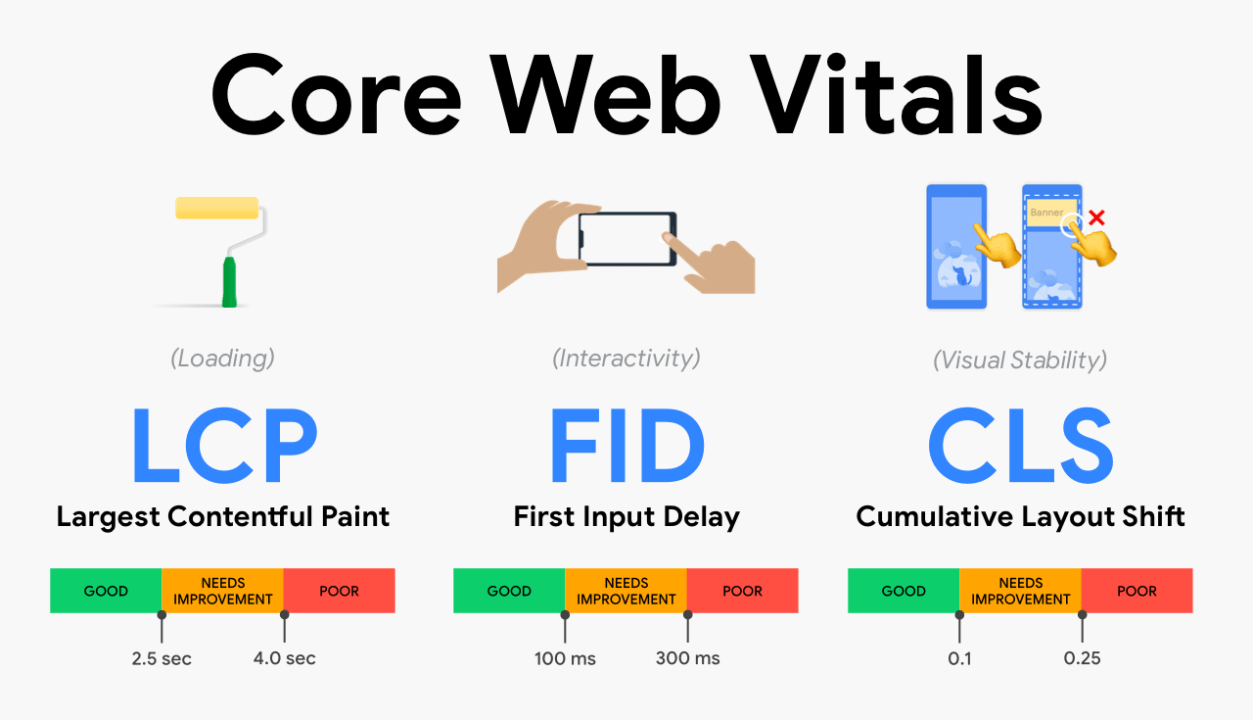
Google Core Web Vitals are a set of specific factors that Google considers essential in a webpage’s overall user experience. They are:
- Largest Contentful Paint (LCP)
- Measures loading performance. Aim for an LCP of 2.5 seconds or faster.
- First Input Delay (FID)
- Measures interactivity. Aim for an FID of less than 100 milliseconds.
- Cumulative Layout Shift (CLS)
- Measures visual stability. Aim for a CLS score of less than 0.1.
How to Measure Core Web Vitals
Utilize tools like Google PageSpeed Insights, Lighthouse, and the Core Web Vitals report in Google Search Console to measure and analyze your site’s performance.
Improving Largest Contentful Paint (LCP)
- Optimize Server Response Times
- Use a fast hosting provider and ensure your server can handle traffic efficiently.
- Serve Images in Next-Gen Formats
- Utilize formats like WebP to reduce image sizes without compromising quality.
- Implement Lazy Loading
- Defer offscreen images to speed up initial loading times.
Enhancing First Input Delay (FID)
- Minimize JavaScript Execution
- Break down long tasks and use web workers to run scripts in the background.
- Optimize Third-Party Scripts
- Limit the use of third-party scripts, as they can significantly delay interactivity.
Reducing Cumulative Layout Shift (CLS)
- Set Size Attributes for Media
- Ensure dimensions are specified for all images, videos, and embeds to prevent layout shifts.
- Avoid Inserting Content Above Existing Content
- Only add new content below the fold or at designated placeholders.
Tools and Plugins for Optimization
- WP Rocket
- A powerful caching plugin that enhances performance.
- Smush
- An image optimization plugin that compresses and lazy loads images.
- Autoptimize
- Aggregates, minifies, and caches scripts and styles, improving overall speed.
Regular Monitoring and Updates
Continuously monitor your site’s Core Web Vitals using tools mentioned earlier and keep your WordPress, themes, and plugins updated to benefit from performance improvements.
By focusing on these aspects, you can improve your site’s Core Web Vitals, leading to a better user experience and potentially higher search engine rankings.
For more detailed guidance or assistance with web development and analytics, contact CodiCo – your partner in creating high-performing websites.